
Most venue operators don't find out what their ticketing software really costs until the first sold-out night. A 4% commission on a $40 ticket looks harmless on a pricing page. Run 1,000 tickets through the door and that same percentage quietly removes $1,600 from a night you already staffed, stocked, and promoted. This guide sorts event ticketing platform options by how they charge rather than by feature checklists, because the pricing model is the part that scales against you. You'll see the difference between commission and flat-fee structures, what each one costs a 1,000-capacity night, and which platforms fit which kind of venue.
Why the Fee Model Matters More Than the Feature List
Every ticketing product on the market sells tickets, scans guests in, and produces a report. Those are table stakes. The variable that changes your P&L is whether the vendor gets paid per ticket sold or per month regardless of volume.
Percentage pricing is easy to start with because there's no upfront cost. It's also the model that punishes success. A slow Tuesday with 80 tickets costs you almost nothing in fees. A Saturday with 1,200 tickets costs you the most on the night you can least afford leakage, because that's the night your staffing, security, and bar costs peak too.
Flat pricing flips that. You pay the same whether you move 200 tickets or 2,000, which means your software cost per guest drops as the room fills. For venues that run a handful of big nights a month, that math usually wins.
There's a third variable people miss: who pays. Some platforms push the fee onto the buyer as a service charge added at checkout. Others absorb it into your settlement. The first protects your margin but can cost conversions if the added fee looks steep at the payment step. The second keeps checkout clean but comes straight out of your revenue.
Three things to check before you compare any two platforms:
- Whether the fee is a percentage of face value, a flat amount per ticket, or a monthly subscription
- When money actually lands in your account, and whether payouts pause until after the event
- Who eats the cost of a refund, a chargeback, or a comped ticket
That last one matters more than most operators expect. A refund policy that claws back the platform fee still leaves you paying for a ticket that never walked through the door.
What a 1,000-Capacity Night Actually Costs
Abstract percentages hide the real number, so let's put one on the table. Say you sell 1,000 tickets at an average of $40, which is $40,000 in gross ticket revenue for the night.
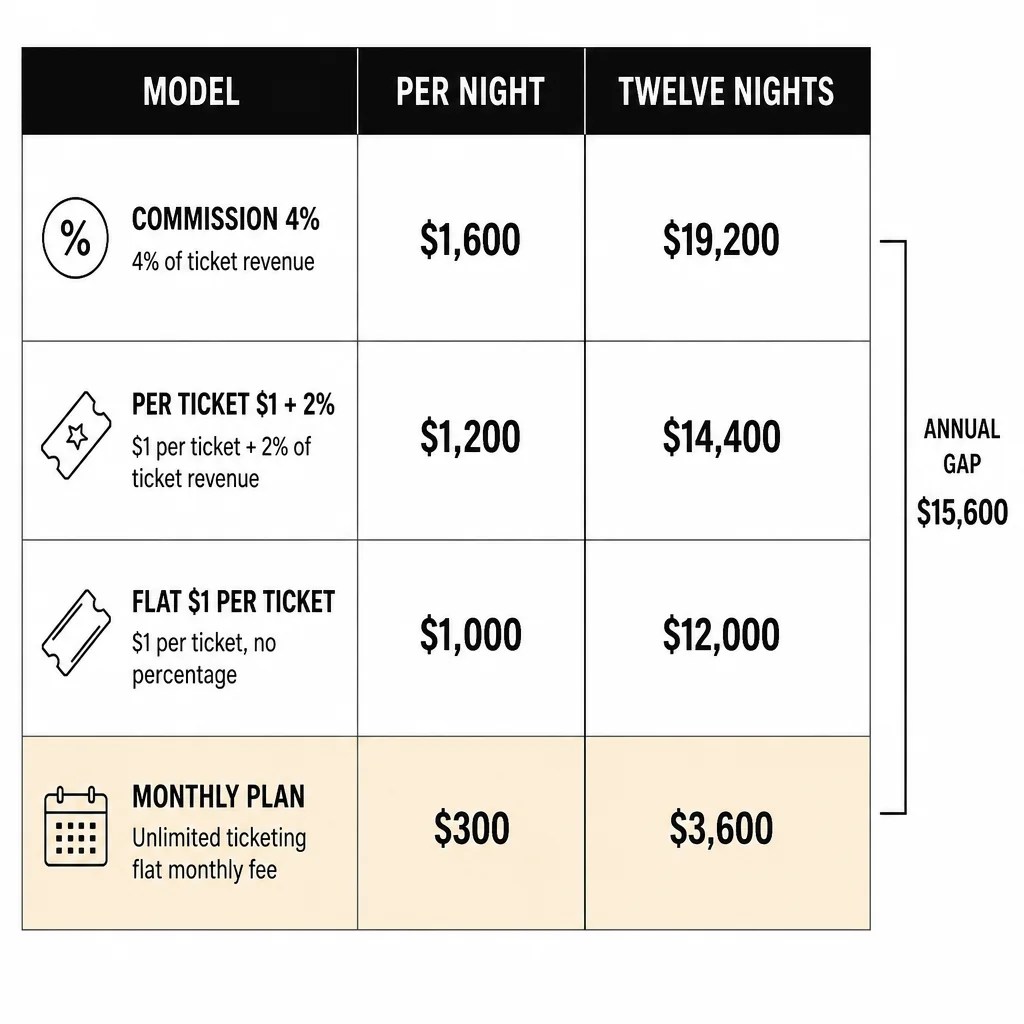
| Fee model | Rate | Cost on a $40,000 night | Cost across 12 similar nights |
|---|---|---|---|
| Percentage of sales | 4% | $1,600 | $19,200 |
| Percentage of sales | 2% + $1 per ticket | $1,800 | $21,600 |
| Flat per-ticket | $1 flat | $1,000 | $12,000 |
| Flat monthly subscription | $300/month | $300 | $3,600 |
The gap between the top and bottom row is $15,600 a year on this single recurring event. That's a security team, a lighting upgrade, or a month of rent.
TicketLeap publishes a structure in this range, describing unlimited ticketing starting at $1 plus 2% per ticket with no contracts or hidden fees. On the 1,000-ticket night above, that lands near $1,800. It's a transparent model and a reasonable one for lower-volume events, but the percentage component still grows every time you sell more.
The lesson isn't that one row wins universally. It's that you should run your own numbers before you sign anything. Take your last three events, multiply actual tickets sold by each candidate's fee structure, and compare the totals. Most operators who do this once stop evaluating platforms on feature grids.
If you want to model it yourself, build a simple estimator: average ticket price, expected tickets sold, number of ticketed nights per month, and the platform's percentage plus per-ticket fee. The output is your annual software cost. Anything above roughly 2% of gross ticket revenue deserves a hard look at whether a flat-fee alternative exists for your venue type.
How the Main Pricing Structures Compare
Before naming specific platforms, it helps to see the categories clearly, because most vendors sit in one of four buckets.
Commission-only. No monthly fee, a percentage taken from every sale. Best for venues with unpredictable volume or a first-ever ticketed event. Worst for anyone selling out regularly.
Flat per-ticket. A fixed dollar amount per ticket, no percentage. Predictable and volume-friendly, but the cost still rises with attendance.
Monthly subscription with no per-ticket cut. You pay for the software like you pay for your POS. The more you sell, the better the deal gets. This is the structure most owner-operators gravitate toward once they've been burned by a percentage model.
Buyer-paid service fees. The platform adds its fee on top of your ticket price. Your face value stays intact, but the buyer sees a higher total at checkout, which can affect conversion on price-sensitive events.
A few platforms mix these. TicketSource, for example, markets itself as a free online ticketing system for any venue or event, which puts it in the no-upfront-cost category where the platform earns from the transaction rather than a subscription. Planning Pod takes the opposite angle, advertising ticketing software with no service fees and low processing fees instead, which shifts the cost conversation toward payment processing rather than platform commission.
Neither approach is dishonest. They just distribute cost differently, and the right one depends on your volume and how price-sensitive your crowd is.
TicketSource
TicketSource positions itself as an easy-to-use, free online event ticketing system for any type of venue or event, with the pitch that you can promote, manage, and Sell Tickets Online at no cost. That "free" framing is worth unpacking, because free-to-list usually means the platform earns somewhere else in the transaction. See TicketSource for current product information.
Best for: smaller venues, community events, and one-off ticketed nights where you don't want a monthly commitment before you know whether ticketing will work for your room.
Cost signal: no upfront platform cost according to the vendor's own description, which makes it a low-risk way to test whether a ticketed night draws a crowd.
Standout: the breadth of the claim. It's built for "any type of venue or event," which suits operators running mixed programming rather than a single format.
Limitation: the snippet doesn't state the per-ticket fee, payout timing, or refund handling. Those are the numbers that decide whether free-to-start is actually cheap at scale, so ask for them in writing before you commit.
Verdict: a sensible starting point for a venue testing ticketed events for the first time. If you're already selling out 1,000-capacity nights, the missing detail is exactly the detail that matters.
TicketLeap
TicketLeap sells event ticketing software with unlimited ticketing starting at $1 plus 2% per ticket, and states there are no hidden fees or contracts. It supports selling online or on-site, which matters if you take door sales alongside presale. See TicketLeap for current product information.
Best for: venues and promoters who want a low base cost with the flexibility to sell at the door as well as online, and who value having no contract to unwind if the fit is wrong.
Cost signal: the published starting structure of $1 plus 2% per ticket is unusually specific for this category, which makes it easy to model. On 1,000 tickets at $40 average, that's roughly $1,800 for the night.
Standout: unlimited ticketing with no contract. You're not locked into an annual commitment while you figure out your event calendar.
Limitation: the percentage component means cost scales with your success. There's also a per-ticket dollar amount layered on top, so the effective rate on a cheap ticket is proportionally higher than on a premium one. A $15 ticket carries a much heavier relative fee than a $75 ticket.
Verdict: a strong fit for mid-volume venues and mixed calendars. If you're consistently pushing four figures of attendance per night, run the annual math against a flat-fee option before renewing.
Planning Pod
Planning Pod takes a different route, describing a platform that manages ticketing, payments, attendees, and event marketing in one place, with low processing fees and no service fees. The distinction between a service fee and a processing fee is the whole story here. See Planning Pod for current product information.
Best for: operators who want ticketing bundled with broader event management rather than a standalone ticket seller, and who dislike line-item service charges appearing on a guest's receipt.
Cost signal: no service fees, with the cost concentrated in payment processing. That usually means your expense tracks card processing rates rather than a platform percentage, which is a more predictable line in your books.
Standout: the all-in-one framing. Ticketing, payments, attendee management, and marketing in one system reduces the number of logins your team juggles on event day.
Limitation: "no service fees" doesn't mean no cost. Processing fees still apply, and the snippet doesn't specify rates, payout timing, or whether the platform charges a subscription. Confirm what processing actually costs at your average ticket price.
Verdict: worth a serious look if you're consolidating tools and want your ticketing expense to look like a payment cost rather than a commission. Less obviously suited to venues that only need a ticket seller and nothing else.
Where Flat-Fee Ticketing Fits for Nightclubs, Lounges, and Beach Clubs
Hospitality venues have a specific problem that general event platforms don't solve: the same guest often buys a ticket and books a table on the same night, and those two transactions usually live in different systems. That split creates the double-booking and door-reconciliation problems operators complain about most.
A flat-fee structure helps here for a simple reason. When your software cost doesn't move with ticket volume, you can price tables, comps, and guest list entries without worrying that each one triggers a fee. You can also run a slow night and a sold-out night on the same software bill.
VenueStack is built for this scenario, with one plan that includes every feature and no cut of ticket sales, so the guest list stays in your account rather than the platform's. For a nightclub running nightclub ticketing alongside table reservations, that means the door, the floor plan, and the post-event numbers sit in one system instead of three. The VenueStack platform covers ticketing, table bookings, deposits, check-in, and reporting, and the flat-fee pricing model is the part that matters most if you're currently paying a percentage on every ticket.
It's not the right answer for a one-off fundraiser with 60 attendees. It is worth evaluating if you run ticketed nights weekly and want your software cost to stay fixed while attendance grows.
Payout Timing, Refunds, and the Fine Print That Costs Money
Fee percentage is the headline, but three operational details decide whether a platform is actually cheap.
Payout timing. Some platforms hold funds until after the event closes. Others pay on a rolling schedule. If you're fronting deposits for talent, security, and inventory before the night happens, a platform that holds your ticket revenue for two weeks is effectively a short-term loan you didn't agree to. Ask when money lands, and whether the schedule changes for high-volume events.
Refund handling. Who absorbs the fee when a ticket is refunded? If the platform keeps its cut and you return the full face value, you've paid to sell a ticket that got cancelled. Understand the ticket refund process before you need it at 11pm on a Friday.
Capacity and check-in. A platform that doesn't connect to your floor plan or capacity limits can let you oversell a room, which is a safety issue and a licensing one. Check-in should work on a phone at the door without a stable connection, because venue wifi fails.
Data ownership. Your guest list is a marketing asset. If it lives in the platform's account and you can't export it cleanly, you're renting your own customer relationships. Confirm export rights in writing.
Contract terms. Month-to-month versus annual matters if your event calendar is seasonal. A beach club that runs hard for four months shouldn't pay for twelve.
Run these five questions past every vendor on your shortlist. The answers differentiate platforms far more than feature pages do.
Matching the Platform to Your Venue Type
The right pick depends on what you actually run, not on which product has the longest feature list.
Festivals and large one-off events. Volume is high and concentrated. Percentage fees hurt most here, so festival ticketing solutions with flat or capped pricing usually beat commission models. Payout timing also matters more, because festival production costs land before the gates open.
Nightclubs and lounges. You need tickets and tables in one system, plus door check-in that works under pressure. Percentage pricing is especially painful because your best nights are your highest-volume nights. See how tickets and tables work when they share one guest record.
Beach clubs. Seasonal volume means a monthly subscription you can pause beats an annual contract. Beach club ticketing usually needs deposit handling for cabanas and day beds alongside general admission.
Event venues and theaters. Reserved seating, price tiers, and comps are standard. If you're embedding booking into an existing site, website ticketing integration is worth reading before you pick a widget.
Restaurants running ticketed dinners. Prepaid seatings protect your most labor-intensive nights from no-shows. Volume is low, so a percentage model is less punishing, but you still want the guest data in your own system.
Questions Operators Ask Before Switching
Does "free" ticketing ever actually cost nothing? Rarely. Free-to-list platforms typically earn from the transaction, from processing, or from upsells. That's fine if the total is lower than a subscription for your volume. Just get the per-ticket number in writing.
Can I switch platforms mid-season without losing my guest list? Only if you can export it. Ask for a full CSV export of attendees, orders, and contact details before you sign, and test the export during your trial rather than after you've committed.
What happens to ticket fees when I refund a guest? It varies. Some platforms return the fee, some keep it, some charge a separate refund processing cost. This is the single most common surprise on a post-event reconciliation.
Is a percentage model ever the better choice? Yes, if your volume is genuinely unpredictable or you're testing whether ticketed events work for your venue at all. Low commitment has real value when you don't yet know your numbers.
How do I compare two platforms fairly? Take your last three events, apply each platform's actual fee structure to real ticket counts and prices, add any monthly subscription, and compare the annual totals. Then check payout timing and refund terms, because those change the effective cost.
Picking on Math, Not Marketing
The event ticketing platforms that don't take a cut of sales tend to win for venues that sell out regularly, because flat costs and volume growth move in opposite directions. Commission models win for venues still testing whether ticketing works for their room, where a low upfront commitment beats a lower long-run cost.
Do the arithmetic on your own numbers before you decide. Three events of real data will tell you more than any comparison page, including this one. Then confirm payout timing, refund handling, and export rights in writing, because those three details decide whether a cheap-looking platform stays cheap in month six.