Sell tickets on your website: Sell Saturday’s tickets and tables on your own website
Put your events calendar, a single event’s checkout or your passes on your own site with one code. Guests buy tickets and book tables without leaving it, in your brand colour, light or dark.
From your booking page to your website.
A calendar widget for your website, in the order you set it up.
Set up your booking page
Choose a calendar or cards for your events page and pick your brand colour. Guests see it on your booking page, in your widgets and at checkout.
Read the guideChoose a widget
The events calendar, your upcoming events as cards, one event’s checkout, your passes, the account sign-in or the chat button. Pick Dark or Light to suit your site, and check it on desktop and mobile.
Read the guideCopy the code
Click Copy, or Copy for AI if an AI tool builds your website. It adds instructions so the code goes in without breaking.
Read the guidePaste it into your site
Add a custom code block in your website builder, paste the whole code and publish. For chat, paste it in the site-wide header or footer so it shows on every page.
Read the guide
In the product.
Booking widget as your team and your guests see it.
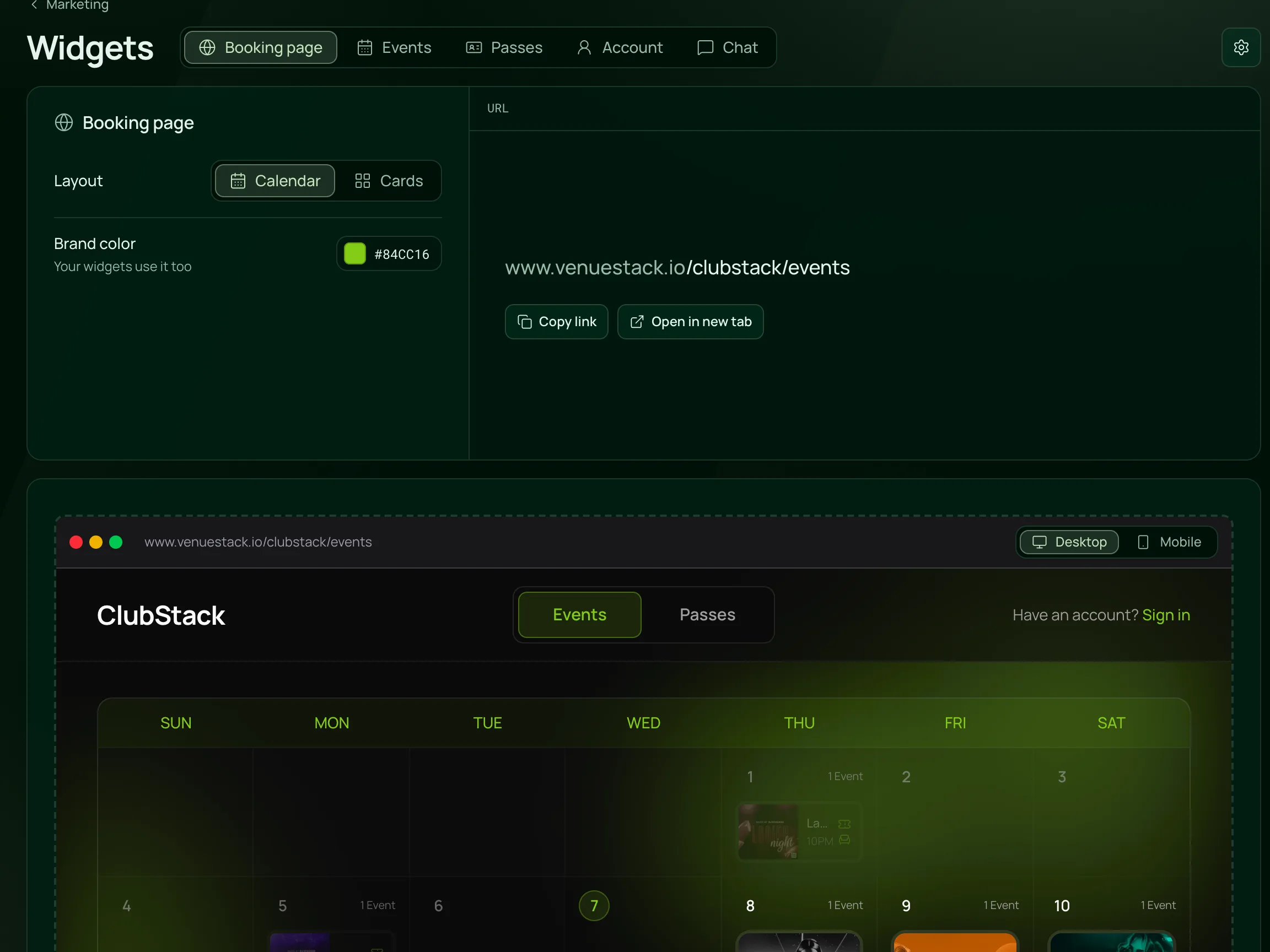
Set it up once
Choose a calendar or cards, set your brand colour and copy the link, with a live preview of your booking page beside it.
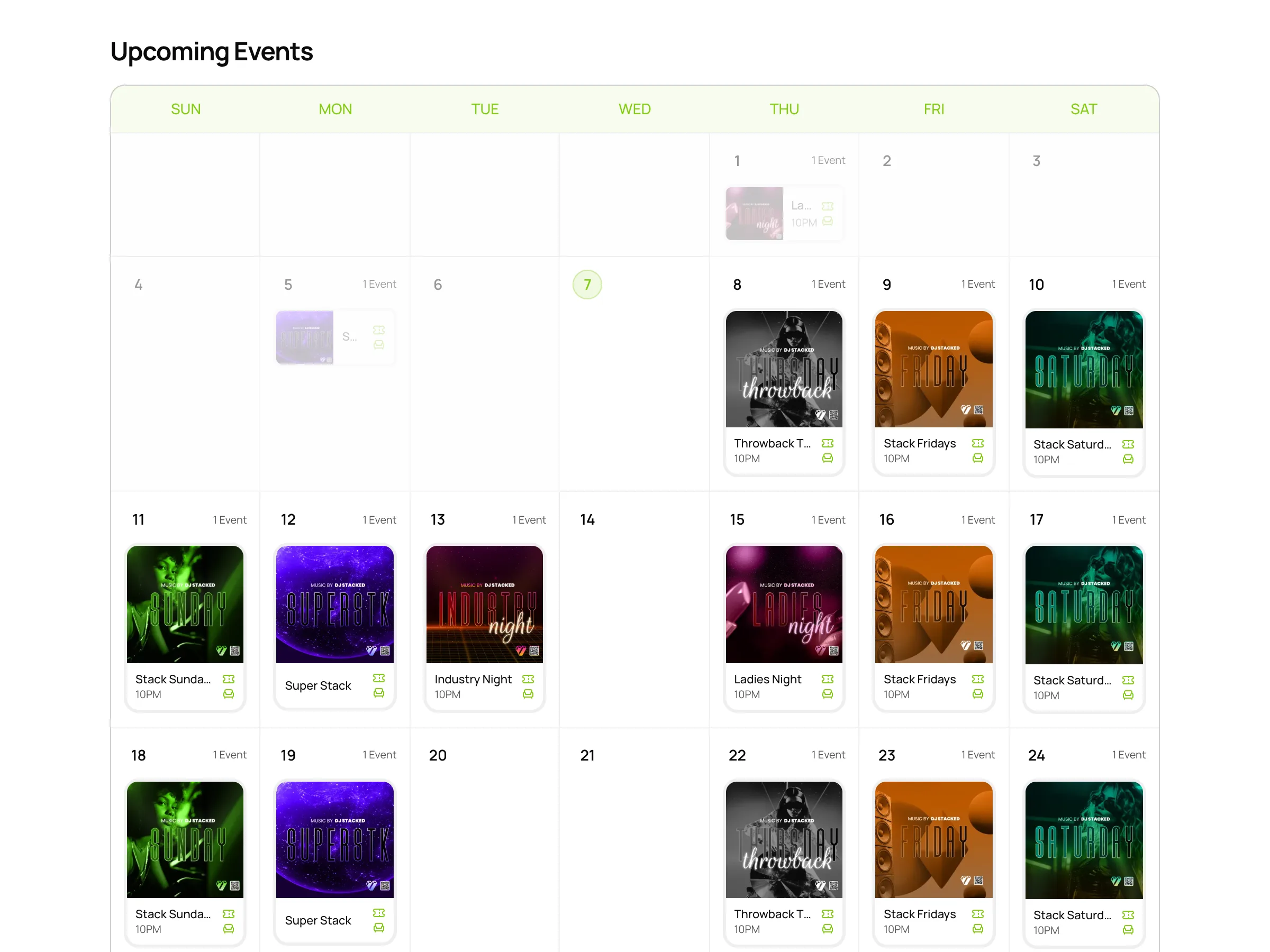
Your calendar, on your own site
The events calendar sits inside your website with each night’s poster, name and time, and checkout opens without leaving the page.
Everything in the widgets.
An event calendar widget and more, on the one plan.
Widgets
Widgets
Your full events calendar, where guests pick a night, buy tickets or book a table.
Your upcoming events, 4 or 6 at a time, with the rest a swipe or an arrow away.
One event’s checkout, for a page about that night.
Every published pass, or one pass’s own page with its checkout.
A sign-in where guests see their tickets, bookings and passes, and a chat button for the corner of every page.
Your look
Widgets use your booking page’s brand colour and follow it when you change it, or take a colour of their own.
Pick Dark or Light to suit your site. The background is always see-through.
Check each widget on desktop and mobile before you copy it.
Add your terms, and guests tick I agree to the terms before they pay, in widgets and on your booking page.
On your website
Each widget is one code to paste into a custom code block, often called Embed, Custom code or HTML.
Instructions for an AI website builder come with the code, so it goes in without breaking.
Put more than one widget on the same page.
If your page’s address has a tracking code such as ?ref=instagram, the Events and Passes widgets pass it on, so the sale counts toward that link.
The Google, Meta and TikTok IDs you add in VenueStack run in your event and pass widgets too.
For venues with a website of their own.
- NightclubsTickets and VIP tables sold on your club’s own site, with the chat button in the corner.VenueStack for nightclubs
- Event venuesA calendar of every event on your website, each with its own checkout.VenueStack for event venues
- Beach clubsDaybeds, cabanas and passes booked from your own site, light or dark to match it.VenueStack for beach clubs



On the one plan.
Booking widget comes with every other feature on one published price, with a free trial before you pay.
One plan. Everything included.
Every feature on every account, and you can cancel whenever you like.
- Event calendar widget
- Ticket sales
- Table management
- Deposits
- Add-ons
- Passes
- Email campaigns
- Reporting
- QR door check-in
- Guest profiles
- Branded public pages
- Team roles and permissions
Questions, answered.
More questionsA part of your booking page that sits on your own website. Guests see your events there and buy tickets or book a table without leaving your site.
Yes, if it lets you add a custom code block, often called Embed, Custom code or HTML. Paste the whole code and publish the page. If an AI tool builds your site, use Copy for AI.
Yes. The events widgets carry the same checkout as your booking page, so guests buy tickets and book tables right there on your site.
Yes. Choose Dark or Light, use your brand colour or give the widget its own, and the background is always see-through.
No. Published events and passes show on their own. Only a change to the widget’s own choices, such as its theme or its own colour, needs the code copied again.
No. Your booking page stays on VenueStack. To sell on your own domain, put the widgets on your website, where guests buy without leaving it.
It’s included in the one VenueStack plan, with every other feature, and there’s a 14-day free trial. The price is on our pricing page.
Keep reading.
The features next to booking widget, and the guides behind it.

Your next event starts here.
Sell tickets, book tables and check guests in from one place.