Event email marketing: Email last Saturday’s crowd about this Saturday
Every ticket buyer, table booking and pass buyer is already on your customer list. Pick who hears about the next night by tag, spend or what they bought, build the email from your own events, and see the sales it brings in.
From the list to the sale.
Nightclub email marketing, in the order you send it.
Start from the night
Pick a starting point such as Event launch, Ticket release or Last chance, or open an event and choose Email guests to start with it filled in.
Read the guideChoose who gets it
Everyone, or filter by tag, by spend on tickets, tables or passes, by when they last bought, or by the events they bought for. People who already bought this night are left out.
Read the guideBuild it and send it
Add event, ticket, table, pass and countdown blocks that stay up to date, check it in light and dark, send a test, then send now or schedule it.
Read the guideSee what it sold
Delivered, opened and clicked, the sales made through its links, and one resend to people who didn’t open.
Read the guide
In the product.
Event email marketing as your team and your guests see it.
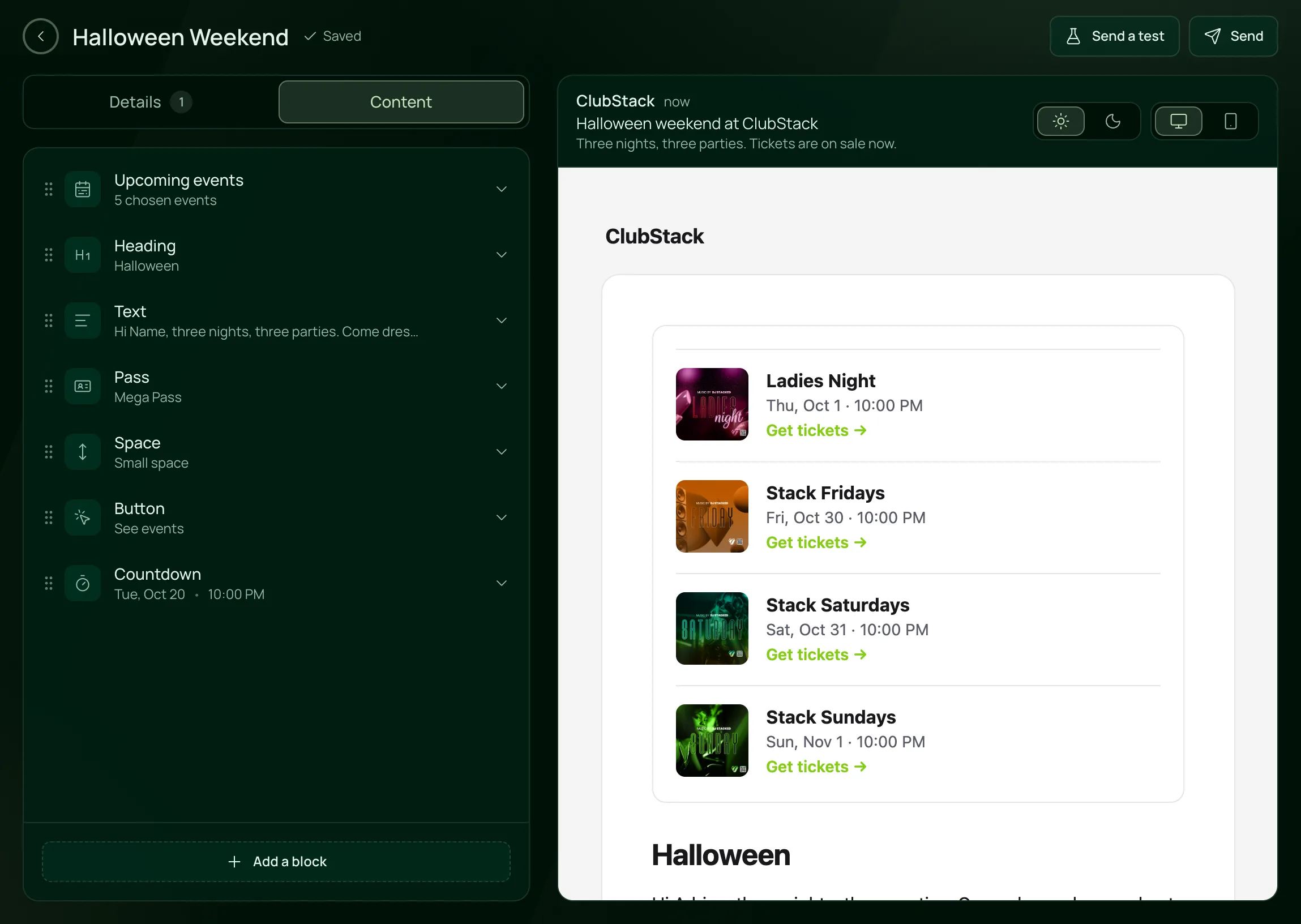
Build the email from your own events
Blocks for headings, text, your upcoming events and passes on the left, the designed email on the right as guests will see it.
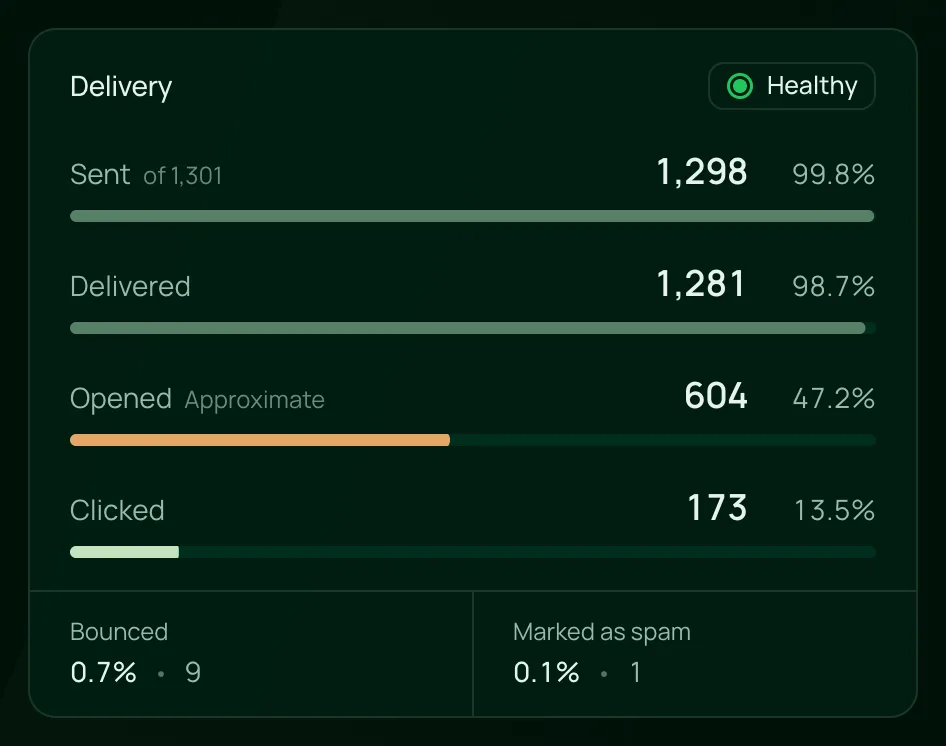
See how it landed
Sent, delivered, opened and clicked for every campaign, with bounce and spam rates kept in view.

Everything in an email.
Email campaigns, on the one plan.
Building
Building
Event launch, This weekend, Ticket release, Tables available, Last chance and Newsletter, or a blank email.
Event, Upcoming events, Ticket, Table and Pass blocks fill in names, dates, prices and pictures, and stay up to date.
A timer to an event’s start or a date you choose, showing the time left whenever the email is opened.
Your venue’s name at the top and your brand colour on the buttons, with every link going to your own event and pass pages.
Audience
Has a tag, Spent, Last bought, Bought tickets to and Booked a table at, as many as you need.
People who already bought or booked the event the email is about aren’t asked again.
Each guest gets at most two of your emails in seven days, and people who stopped opening are left out unless they bought recently.
Every email carries your address and an Unsubscribe link, and addresses that bounce or report spam are never emailed again.
Sending
Send a test to people on your team before it goes out.
Send now or pick a date and time in your venue’s time zone, then pause, resume or cancel what hasn’t gone out.
The plan includes a set number of emails each month, and the audience shows how many are left.
If an event in a scheduled email is canceled or changes date or price, the email waits for your review.
Results
Sent, delivered, opened, clicked, bounced and marked as spam, as they come in.
Tickets, tables and passes bought through the email’s own links, with refunds left out.
One resend per email, with a new subject, to people who didn’t open it.
Every email in a period together, with list health and the hours your guests open.
For venues with a crowd to bring back.
- NightclubsA weekly night with a list that grows every week, emailed by what each guest bought.VenueStack for nightclubs
- Ticketed eventsThe next show announced to everyone who bought the last one.VenueStack for ticketed events
- LoungesRegulars tagged and emailed about the nights they come for.VenueStack for lounges


On the one plan.
Event email marketing comes with every other feature on one published price, with a free trial before you pay.
One plan. Everything included.
Every feature on every account, and you can cancel whenever you like.
- Event calendar widget
- Ticket sales
- Table management
- Deposits
- Add-ons
- Passes
- Email campaigns
- Reporting
- QR door check-in
- Guest profiles
- Branded public pages
- Team roles and permissions
Questions, answered.
More questionsEveryone on your Customers list with an email address: guests who bought tickets, booked tables, bought passes, chatted with you or were imported. Guests who unsubscribed, or whose address bounced, are left out.
Yes. Filter by Bought tickets to or Booked a table at and pick last week’s event, or use Last bought for a window of time.
No. Emails are built and sent from VenueStack, to the customer list your sales already fill, and each one reports the sales it brought in.
Each email counts the tickets, tables and passes bought through its own links, with refunds left out. A second line counts everyone who got it and bought anything within 7 days.
Every email has an Unsubscribe link, guests can untick news and offers at checkout, and you can unsubscribe a guest who asks you. Their tickets and receipts still arrive.
It’s included in the one VenueStack plan, with every other feature and a monthly sending allowance, and there’s a 14-day free trial. The price is on our pricing page.
Keep reading.
The features next to event email marketing, and the guides behind it.

Your next event starts here.
Sell tickets, book tables and check guests in from one place.