Clicker counter app: Count every door into one total, as it happens
The Door Clicker sits beside the ticket scanner on a phone or iPad. Tap Male or Female as each guest walks in, and every door counting the same event adds to one number. Owners and managers get an alert when it reaches your capacity.

From the first tap to the morning after.
A clicker counter for the door, in the order the night uses it.
Set your capacity
Enter how many people your venue holds, so owners and managers get an alert when the count reaches it.
Read the guideCount at the door
Open Scanner, tap Clicker, check tonight’s event and tap Male or Female for each guest. A wrong tap comes off with the minus under its pad.
Read the guideEvery door, one total
Each phone or iPad counting the event adds to the same total. Without a signal, taps are saved on the device and sent when it’s back.
Read the guideRead the night back
The door report shows everyone through the door, the male and female split, arrivals by hour and how the count compares with tickets and passes scanned.
Read the guide
In the product.
Door Clicker as your team and your guests see it.
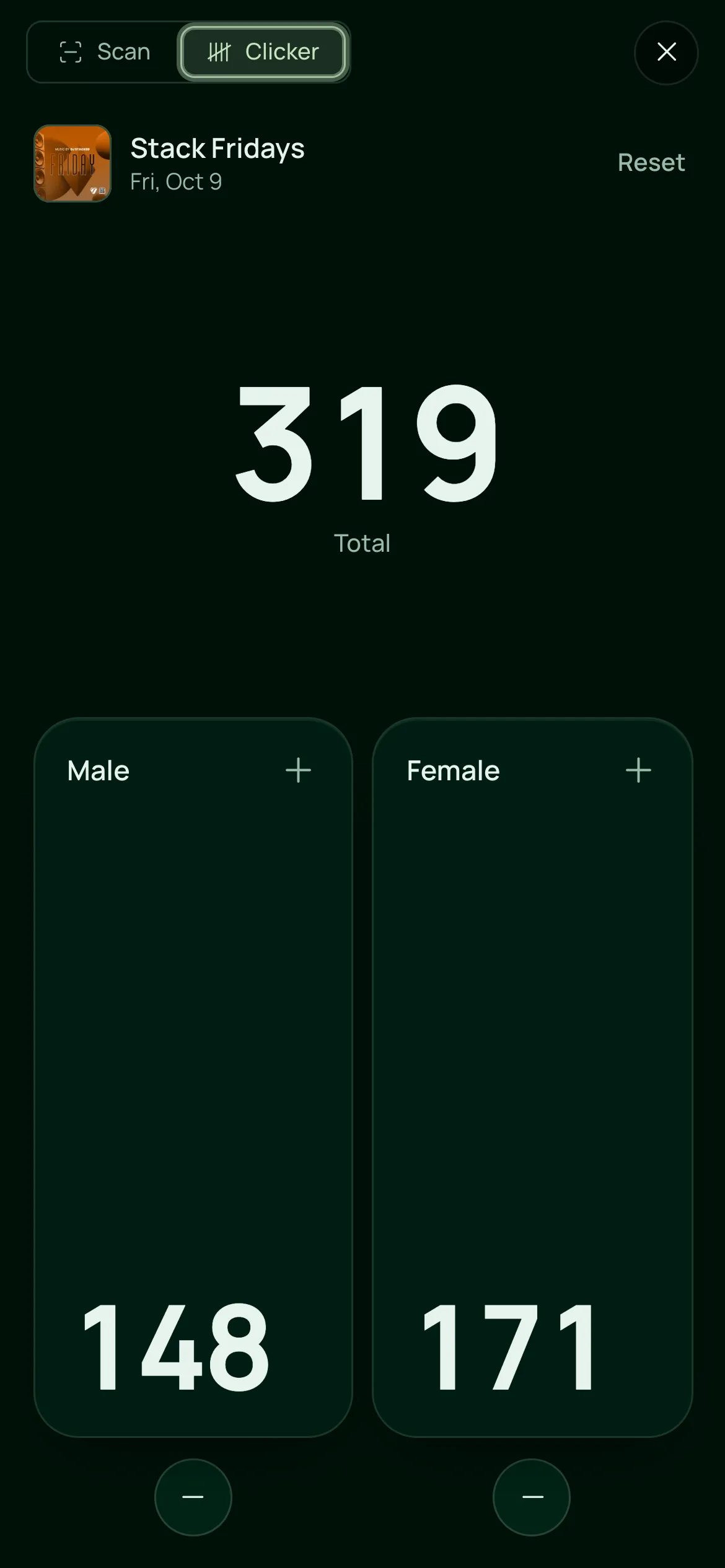
Count the door by hand
Tap Male or Female as each guest walks in. Every phone counting the same event adds to one total.

Everything in the Door Clicker.
A clicker counter app built into the door, on the one plan.
Counting
Counting
Male and Female side by side, with the total above. Each tap counts the moment your finger lands, with a short buzz.
The minus under each pad takes one off, and a count never goes below zero.
Reset shows the numbers first, then starts every device on the event from zero. It needs Full Access and a connection.
Switch between Scan and Clicker without losing your place in either.
Every door
Every device counting the same event adds to one total, whichever door it’s on.
Taps are saved on the device with no connection, and Sync shows how many are waiting to send.
If more than one event is on tonight, each door chooses the one it counts.
Hand counts and ticket check-ins are kept apart, so you can set one against the other.
Capacity and reports
Owners and managers with Full Access to Tickets get a push and a bell alert when the count reaches your capacity.
Everyone through the door, the male and female shares, your average and busiest nights, and the busiest hour.
Each night sets the door count against tickets and passes scanned. Not scanned is everyone let in without a scan, such as walk-ins.
How many people each team member counted, less their own corrections.
Owners get last night’s door count with tickets, tables and sales, from 10 AM the next day.
For doors that count.
- NightclubsA busy door with a capacity to keep to, and a male and female split to read the next day.VenueStack for nightclubs
- FestivalsSeveral gates adding to one total, and still counting where the signal is weak.VenueStack for festivals
- Event venuesOne count across every entrance, with an alert when it reaches your capacity.VenueStack for event venues



On the one plan.
Door Clicker comes with every other feature on one published price, with a free trial before you pay.
One plan. Everything included.
Every feature on every account, and you can cancel whenever you like.
- Event calendar widget
- Ticket sales
- Table management
- Deposits
- Add-ons
- Passes
- Email campaigns
- Reporting
- QR door check-in
- Guest profiles
- Branded public pages
- Team roles and permissions
Questions, answered.
More questionsA hand counter the door taps once for each person who walks in. The VenueStack Door Clicker is on the phone or iPad beside the ticket scanner, counts male and female, and adds every door to one total.
No. The Door Clicker counts people in. The minus under each pad corrects a wrong tap, but there is no count for guests going out, so the total is everyone through the door tonight.
Yes. Every phone or iPad counting the same event adds to one total, and the door report shows how many each team member counted.
Yes. Taps are saved on the device and sent as soon as it’s back online. Resetting the count, and seeing other doors’ taps, need a connection.
No. The Door Clicker is part of VenueStack, next to the scanner your door already uses, and its counts go into your reports.
It’s included in the one VenueStack plan, with every other feature, and there’s a 14-day free trial. The price is on our pricing page.
Keep reading.
The features next to door clicker, and the guides behind it.

Your next event starts here.
Sell tickets, book tables and check guests in from one place.