Guest list app: Swap the clipboard for a QR code per guest
Your promoters add names or share their own sign-up link, and guests can ask to join from the night’s ticket page. You approve each name, every guest gets a QR code of their own, and the door scans it like a ticket.
From the first name to the door.
Guest list management for a club night, in the order you run it.
Open the list for a night
On the event’s Guest list tab, turn on Take guest list names and choose when sign-ups close. Turn on Show on your event page and guests can ask from the ticket page too.
Read the guideNames come in
Promoters type names in or share their own sign-up link. A guest who signs up gives a name and an email for each person they bring, so everyone gets a QR code of their own.
Read the guideApprove them
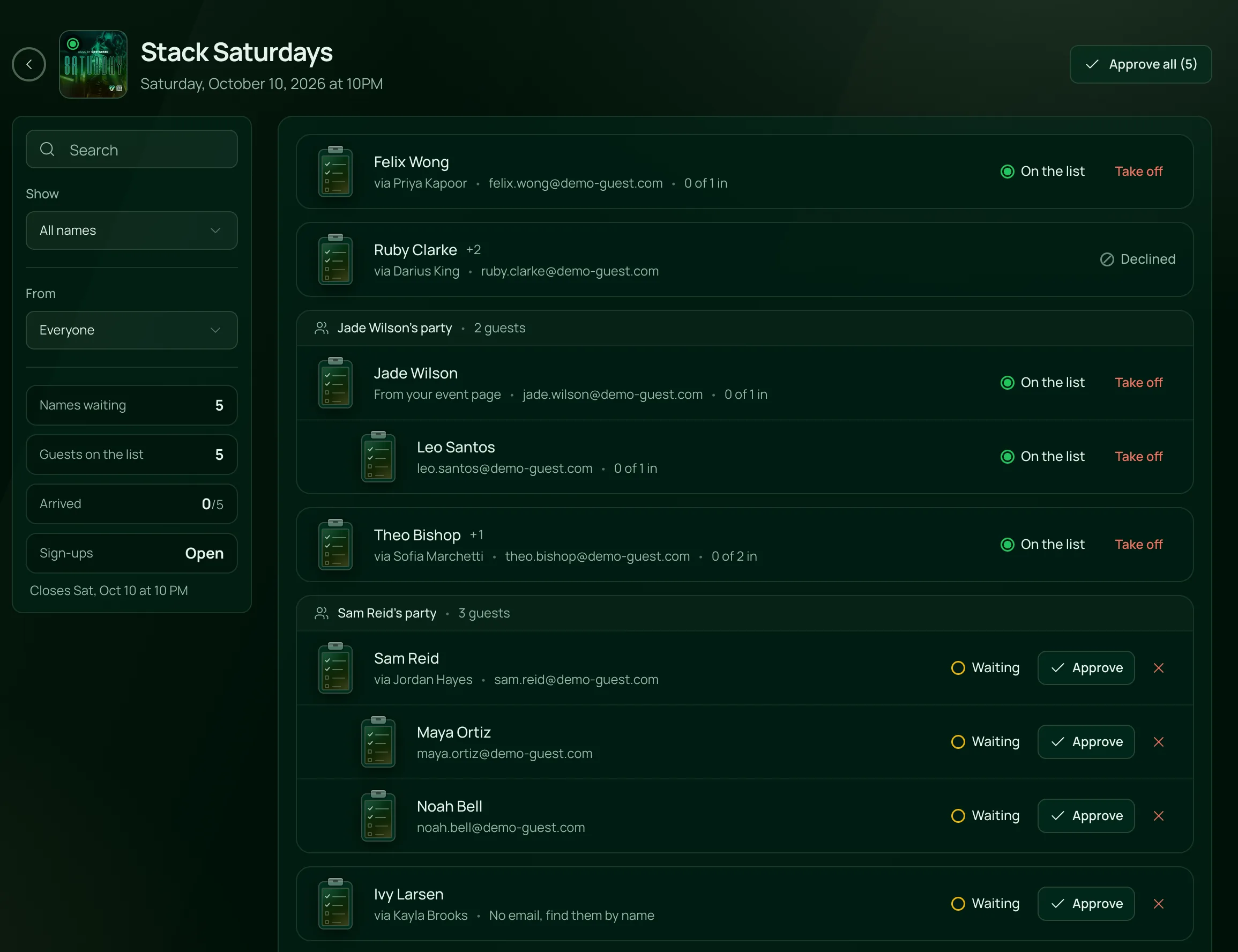
Names wait on the Guest List page with the promoter who brought them. Approve or decline each one, or approve them all, and take a name off later if plans change.
Read the guideScan them in
Each approved guest gets an email with their QR code and Wallet buttons. The check-in app scans it as Guest list, and finds a name without an email by search.
Read the guide
In the product.
Guest list app as your team and your guests see it.
A sign-up link for every promoter
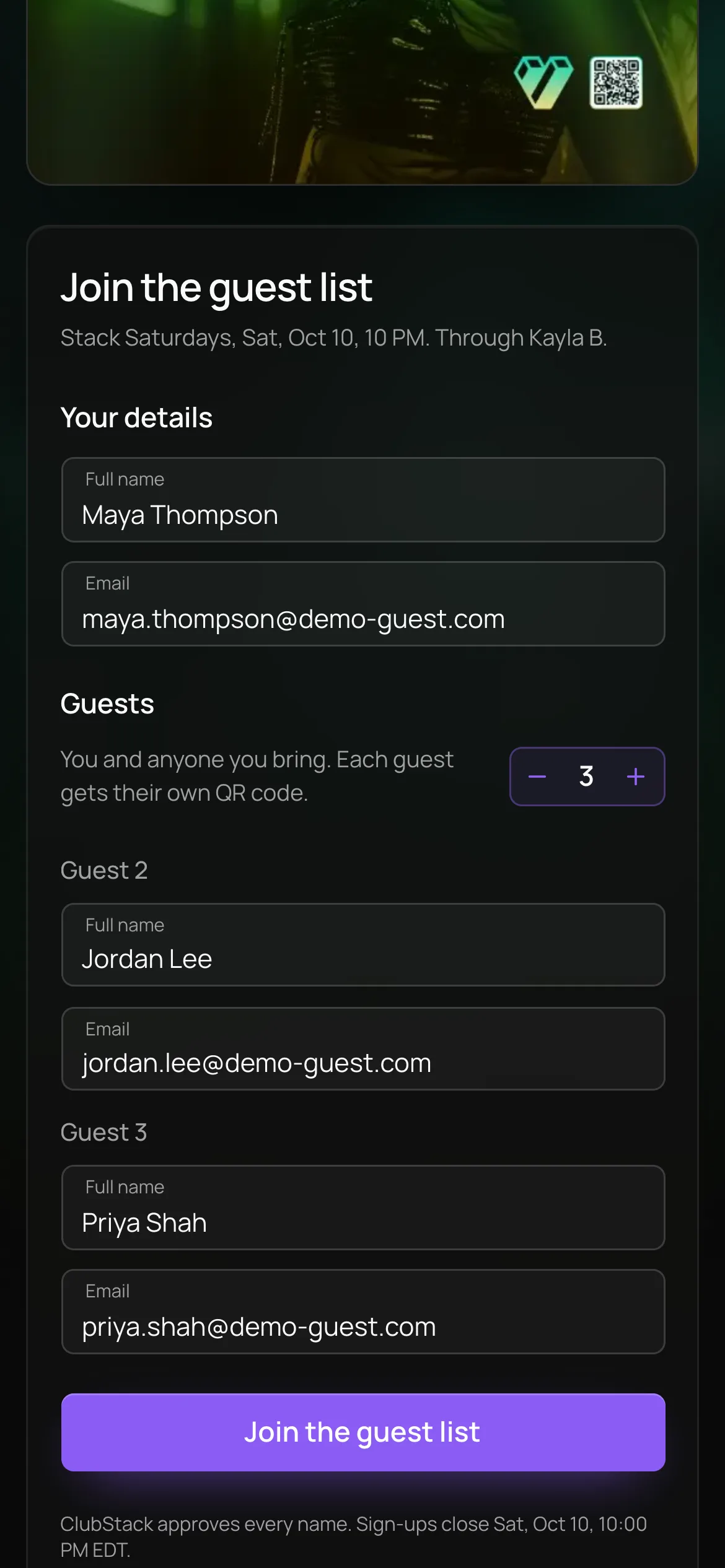
Guests join through a promoter’s link or your ticket page, with a name and an email for each friend, so everyone gets a QR code of their own.
On for the nights you choose
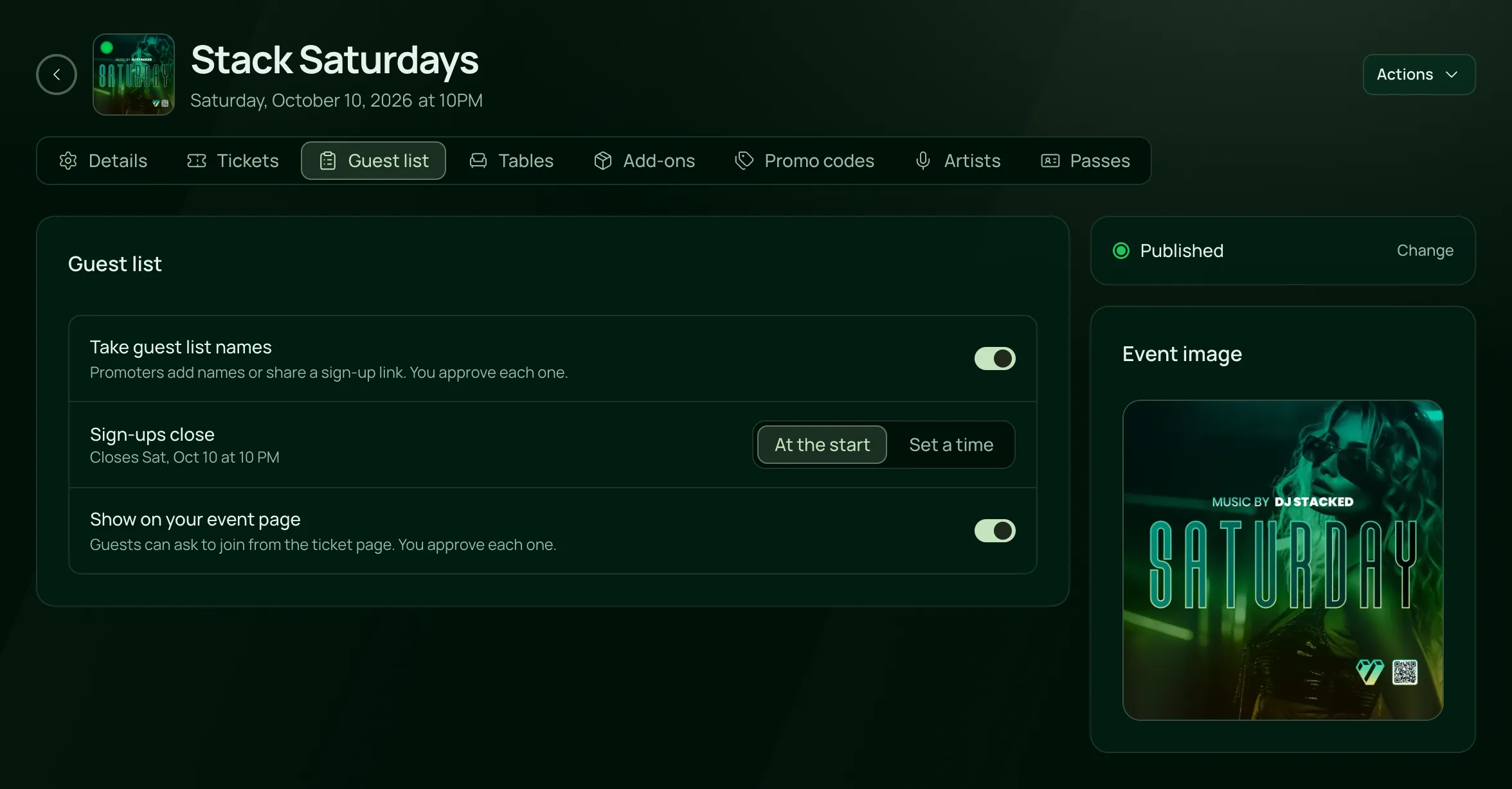
Turn the guest list on for a night, choose when sign-ups close, and decide whether guests can ask from your event page.

Everything in the guest list.
Names, approvals and the door, on the one plan.
Taking names
Taking names
Turn the guest list on for the nights that take one. Sign-ups close when the night starts, or at a time you set.
Promoters add names from their own dashboard, with an email for the QR codes or without one, or share a sign-up link that credits them.
Show on your event page adds Join the guest list to the night’s ticket page, on your booking page and in your Events widget.
Guests give their name and email, then a name and email for each friend, up to ten people in all.
An email already on the night’s list can’t sign up again, so nobody holds two places.
Approving
The Guest List page holds every night taking names, by month, with Upcoming, Past and All and a search.
Each name shows the promoter who added it, or From your event page. A party shows as one card, its lead first.
Approve or decline names one by one, or every waiting name at once. Filter by status or by promoter.
Take an approved name off the list, and their QR codes stop working.
A teammate who is also one of your promoters can’t approve the names they brought.
Limits and alerts
Cap how many guests each promoter can put on a night, for all of them or for one. A party of four takes four spots.
Owners and anyone with Full Access to Tickets get a Guest list alert when names are waiting for approval.
A name still waiting after 15 minutes, or the time you choose, shows in Pulse and turns urgent once the night is six hours away.
An event’s menu opens its guest list, and Stats and Compare show guests on the list, arrived and waiting.
At the door
Each approved guest gets a free ticket of their own, by email, with Add to Apple Wallet and Add to Google Wallet.
The check-in app scans it on any phone or iPad, like a ticket, and shows Guest list.
A name added without an email gets no QR code by email. The door finds it by name and checks it in by hand.
Tonight’s guest list is saved on each door device with the tickets, so it still scans when the signal drops.
Guest list places are free and stay out of your sales reports.
For nights with a list at the door.
- NightclubsPromoters fill the list, a manager approves it, and the door scans every name.VenueStack for nightclubs
- LoungesFriends of the house and regulars, approved before they arrive.VenueStack for lounges
- Ticketed eventsGuests and comps on the same scanner as the paid tickets.VenueStack for ticketed events



On the one plan.
Guest list app comes with every other feature on one published price, with a free trial before you pay.
One plan. Everything included.
Every feature on every account, and you can cancel whenever you like.
- Event calendar widget
- Ticket sales
- Table management
- Deposits
- Add-ons
- Passes
- Email campaigns
- Reporting
- QR door check-in
- Guest profiles
- Branded public pages
- Team roles and permissions
Questions, answered.
More questionsA guest list app, or guestlist app, replaces the clipboard at the door. Names go on a digital guest list before the night, someone approves them, and each guest arrives with a QR code the door scans. In VenueStack the guest list sits on the same event as your tickets and tables.
Yes. A promoter’s sign-up link puts guests on that promoter’s list, and Show on your event page lets anyone ask to join from the night’s ticket page. Every name waits for your approval.
Yes. Your door uses the VenueStack check-in app on any phone or iPad, the same one that scans tickets. A guest list QR code shows as Guest list, and a name without an email is found by search and checked in by hand.
Yes. Set Spots per night in Promoter settings for every promoter, or give one promoter their own number. It counts guests, so a party of four takes four spots.
No. Guest list places are free tickets and stay out of your sales reports. The calendar shows guests on the list, arrived and waiting, and the promoter report counts list guests who arrived.
Yes. Set a Guest list commission as an amount per guest who arrives, and VenueStack works out what each promoter earned. It doesn’t pay promoters: you pay them your own way.
It’s included in the one VenueStack plan, with every other feature, and there’s a 14-day free trial. The price is on our pricing page. Guest list tickets are free, so they carry no fees.
Keep reading.
The features next to guest list app, and the guides behind it.


Your next event starts here.
Sell tickets, book tables and check guests in from one place.