Season pass software: Sell regulars the season once, and scan them in every night
A pass covers every event or only the nights you choose, for set dates or a number of days, with a limit on entries. Guests buy it from your booking page, keep it in their account or Wallet, and your door scans it like a ticket.


From the first pass to the last night.
Season pass software for a club, in the order you use it.
Build the pass
Name it, add square artwork, then set what it covers: all events or chosen ones, fixed dates or a number of days from issue, and entries per event and in total.
Read the guideSell it or give it
Set a price, sales dates and limits, then publish it to your booking page and the Passes widget. Or issue a complimentary pass to a guest’s email.
Read the guideScan it at the door
The same scanner reads passes, counts tonight’s entries and refuses a pass for the wrong night or with no entries left. Passes scan offline too.
Read the guideLook after holders
Suspend, extend or refund a pass, and the change reaches the guest’s Wallet. Guests get a reminder 7 days before their pass ends.
Read the guide
In the product.
Event passes as your team and your guests see it.
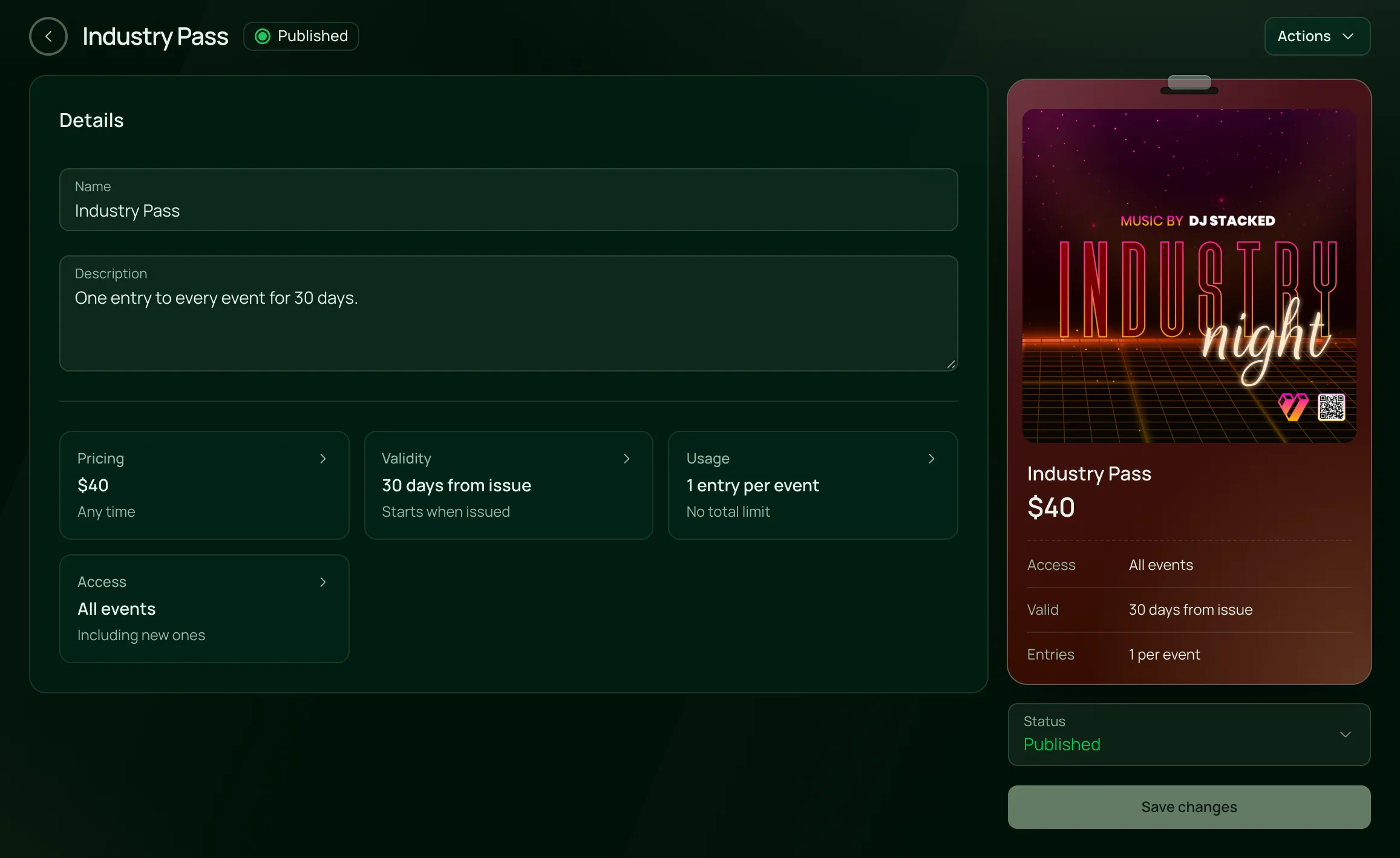
Build a pass and see it as guests will
Name it, price it, choose the events, the validity and the entries, beside a live preview of the pass.
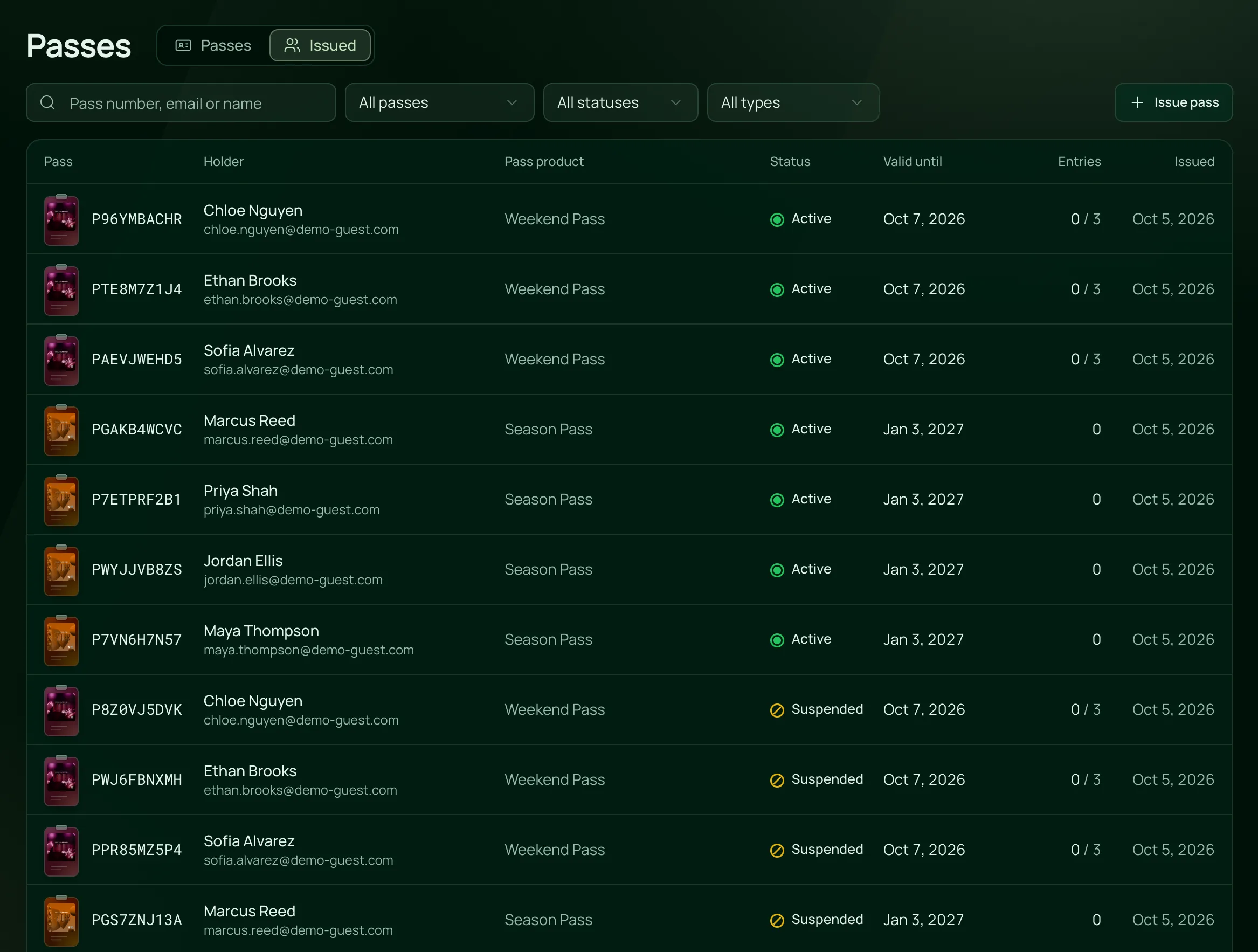
Every pass you’ve issued
Each pass with its holder, its status, when it runs out and how many entries are used, ready to suspend or extend.

Everything in a pass.
Event passes and memberships, on the one plan.
What it covers
What it covers
All events includes nights you add later. Selected events covers only the nights you tick.
A fixed range, such as a summer season, or a number of days from the night it’s issued.
Set entries per event and a total, or make either unlimited.
Dates still in a recurring night’s new schedule stay on the pass, and a date a holder has used is kept as it is.
Selling
A price, sales start and end dates, a cap on how many sell and a limit per guest.
Published passes show under Passes on your events page, and the Passes widget puts them on your own site.
Guests buy with their name and email, and the pass goes to the account for that email.
Send a tracking link straight to your passes, or start an email about a pass from the pass itself.
Issue a pass to a guest’s email at no charge, with the reason recorded.
At the door
Admitted shows the holder, the pass, and the entries used tonight and in total.
Expired, not valid for this event, already used, no entries left, suspended or refunded, each said in words.
Staff you allow can let a holder in past the limit, with a reason that stays on the pass.
Passes keep their entry limits when the scanner is offline.
Holders
Guests sign in with an emailed code to see the pass and its QR code, or add it to Apple Wallet or Google Wallet.
Each change is logged with who made it, and the Wallet copy updates.
Sales, admissions, how many holders used their pass and the events they came to.
A reminder 7 days before a pass ends, and a note when it has ended.
For venues with regulars.



On the one plan.
Event passes comes with every other feature on one published price, with a free trial before you pay.
One plan. Everything included.
Every feature on every account, and you can cancel whenever you like.
- Event calendar widget
- Ticket sales
- Table management
- Deposits
- Add-ons
- Passes
- Email campaigns
- Reporting
- QR door check-in
- Guest profiles
- Branded public pages
- Team roles and permissions
Questions, answered.
More questionsOne QR code that lets its holder into more than one event. You choose which events it covers, for how long and how many entries it has, and the door scans it like a ticket.
Yes. Set the pass to cover all events or chosen nights, for a fixed season or a number of days from issue, such as 30. Guests buy it from your booking page or a widget on your website.
No. A pass is paid once and runs for its dates. You can extend one by hand, and the guest gets a reminder 7 days before it ends.
Yes. Issue a complimentary pass to their email with a reason. VenueStack doesn’t email them about it, so tell them to sign in to their account at your venue with that email to see it.
No. Passes scan in the same check-in app as tickets, offline included, with tonight’s entries counted on each scan.
Passes are included in the one VenueStack plan, with every other feature, and there’s a 14-day free trial. The price is on our pricing page. You choose whether guests pay the processing and platform fees on a paid pass or your venue covers them.
Keep reading.
The features next to event passes, and the guides behind it.

Your next event starts here.
Sell tickets, book tables and check guests in from one place.