Promoter tracking links: Know which flyer, promoter or post filled Saturday
Give each place you promote its own tracking link and QR code, from the flyer on the bar to each promoter’s DMs. Reports show the views, orders and sales each one brought in, and your Meta, Google and TikTok pixels count every purchase.
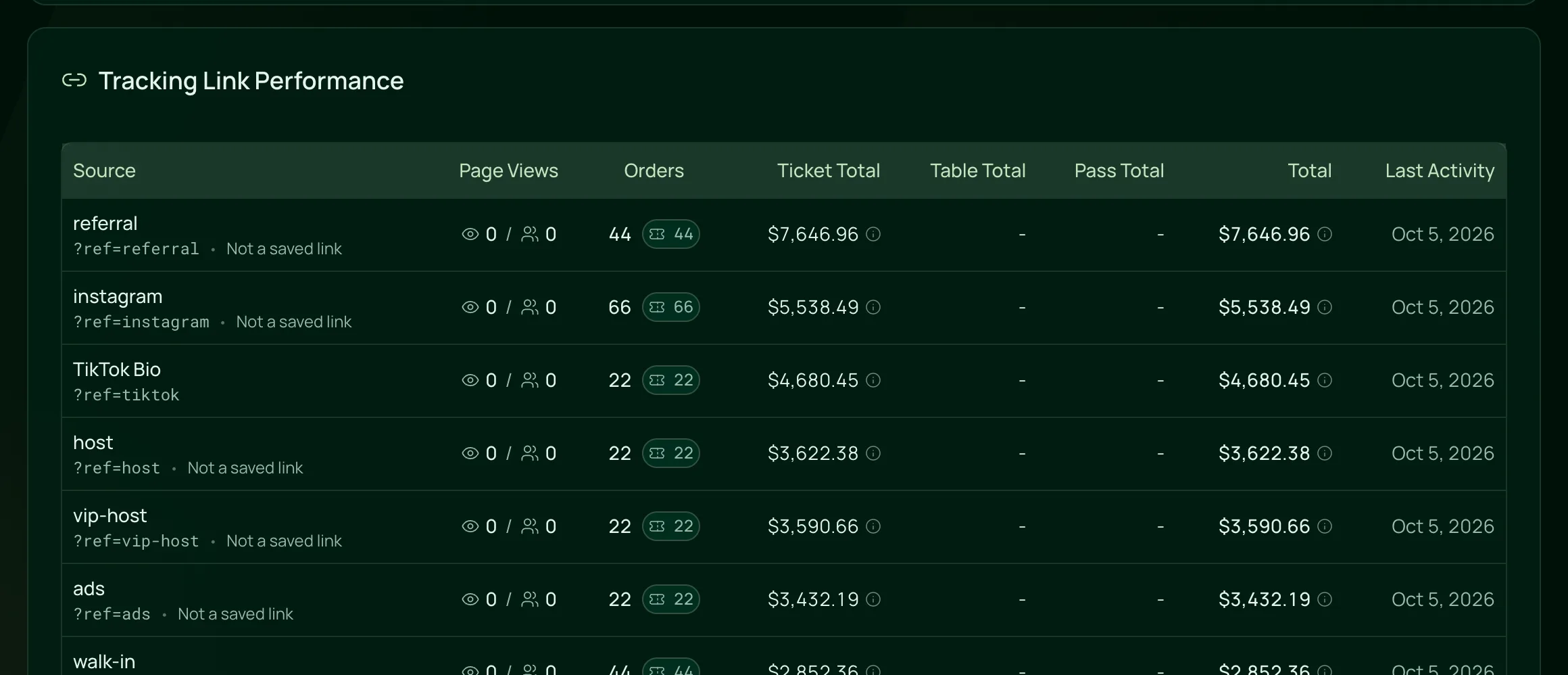
From the flyer to the sale.
Promoter tracking, in the order you run a campaign.
Make a link for each place
In Marketing, open Tracking Links and click New link. Name it after the place, such as Instagram or a promoter, and the code is made from the name.
Read the guideShare it or print it
Copy the link for a bio or a DM, or download its QR code as an SVG for flyers and posters. It stays sharp at any size.
Read the guideConnect your ad pixels
Add your Google Analytics, Google Ads, Meta and TikTok IDs, and each purchase is sent to them with no code to add.
Read the guideSee what each one brought in
Reports show each link’s page views, orders and sales, and the ticket and pass reports show where buyers came from.
Read the guide
In the product.
Promoter tracking links as your team and your guests see it.
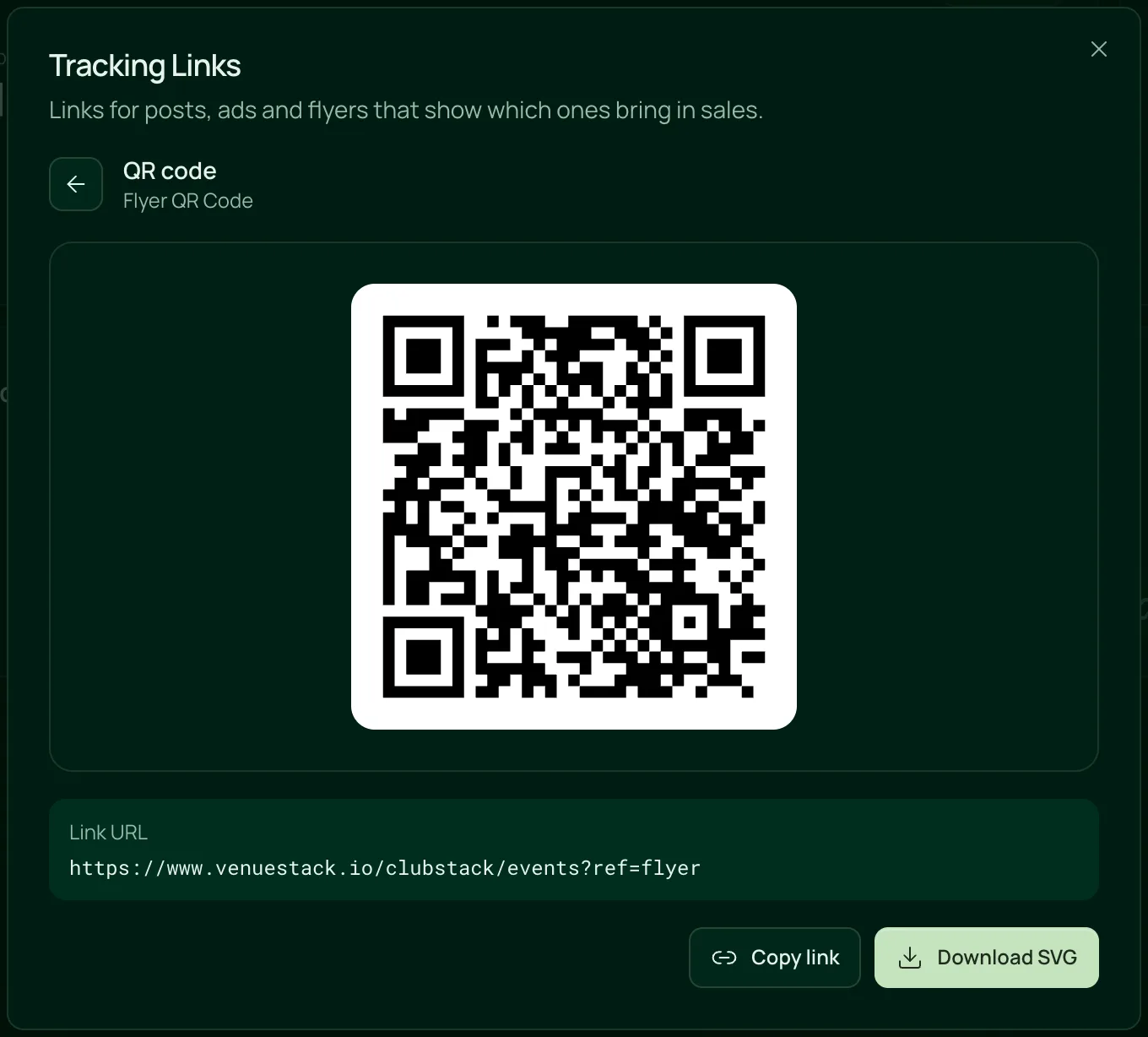
A QR code for every flyer
Every tracking link comes with its own QR code, ready to copy or download for print.

Everything in a tracking link.
Tracking links, QR codes and pixels, on the one plan.
Links and QR codes
Links and QR codes
Give each channel its own link, such as your Instagram bio, a flyer or a promoter.
Show any link as a QR code and download it as an SVG that stays sharp at any size.
Edit a link’s name or description and its code stays the same, so links you’ve shared keep working.
Add view=passes to a link to send guests to your passes.
Delete a link and the sales it brought in stay in your reports.
Results
Page views, orders and sales for each link, with pass sales shown on their own.
The ticket report ranks your tracking links and promo codes, with Direct for sales without a link.
The pass report ranks your links by pass sales before fees.
A tracking code in your website’s address carries into the Events and Passes widgets, so a sale there still counts.
Each email you send tracks its own sales with links of its own.
Ad pixels
Google Analytics 4, Google Ads, Meta Pixel and TikTok Pixel. Paste the IDs you use and leave the rest empty.
GA4 gets a purchase event, and Meta and TikTok get Purchase and CompletePayment with the amount paid.
Each order is sent once, even if the guest reloads the confirmation page.
Your events page, checkout, confirmation pages, pass pages and embedded widgets.
Pass purchases send the same events, free passes included.
For nights sold by many hands.
- NightclubsA link for each promoter, each bio and each flyer, and one report of what each one sold.VenueStack for nightclubs
- FestivalsQR codes on posters and partner sites, each counted on its own.VenueStack for festivals
- Ticketed eventsAd pixels that count every purchase, beside the links you share yourself.VenueStack for ticketed events

On the one plan.
Promoter tracking links comes with every other feature on one published price, with a free trial before you pay.
One plan. Everything included.
Every feature on every account, and you can cancel whenever you like.
- Event calendar widget
- Ticket sales
- Table management
- Deposits
- Add-ons
- Passes
- Email campaigns
- Reporting
- QR door check-in
- Guest profiles
- Branded public pages
- Team roles and permissions
Questions, answered.
More questionsEach tracking link is your events page link with a short code on the end, and its QR code opens the same link. When a guest scans it and buys, the sale counts toward that link in your reports.
Yes. Give each promoter their own link or QR code, and reports show the page views, orders and sales each one brought in.
No. Tracking links show what each promoter’s link sold, and you pay them your own way.
No. A tracking link adds one short code, such as ?ref=instagram, and VenueStack counts its views and sales for you. To see where all your visitors came from, connect Google Analytics.
Yes. Download it as an SVG, which stays sharp at any size, from a flyer to a poster.
No. Pixels takes four IDs: Google Analytics 4, Google Ads, Meta Pixel and TikTok Pixel. They run on your VenueStack pages and widgets, so add the same IDs to your own website separately.
It’s included in the one VenueStack plan, with every other feature, and there’s a 14-day free trial. The price is on our pricing page.
Keep reading.
The features next to promoter tracking links, and the guides behind it.
Playbooks

Your next event starts here.
Sell tickets, book tables and check guests in from one place.