CRM for events and venues: Know the regular at table 4 before they sit down
Every ticket, table booking, pass and chat adds the guest to your customer list on its own. Open their profile to see what they’ve spent, every visit and the tags your team gave them, from the Customers page, the table card or the chat.

From the first ticket to the regular.
Guest management software that fills itself, in the order a guest meets you.
The list builds itself
Ticket orders, table bookings, pass purchases and chats add guests as they happen. Bring in guests from another system with a CSV, and anyone already on the list is updated, not added twice.
Read the guideOpen the profile
Contact details, tags and spend on tickets, tables and passes, with Reservations, Tickets, Chats and Passes tabs for the whole history. Open it from Customers, from a table card on the night or from a chat.
Read the guideRate, tag and note the night
Complete a visit with a 1 to 5 star rating and feedback, add tags such as VIP, and leave notes on the booking for the team.
Read the guideBring them back
Filter the list by tag, spend, rating or date added, email a group by what they bought, or export everyone to a spreadsheet.
Read the guide
In the product.
Guest CRM as your team and your guests see it.
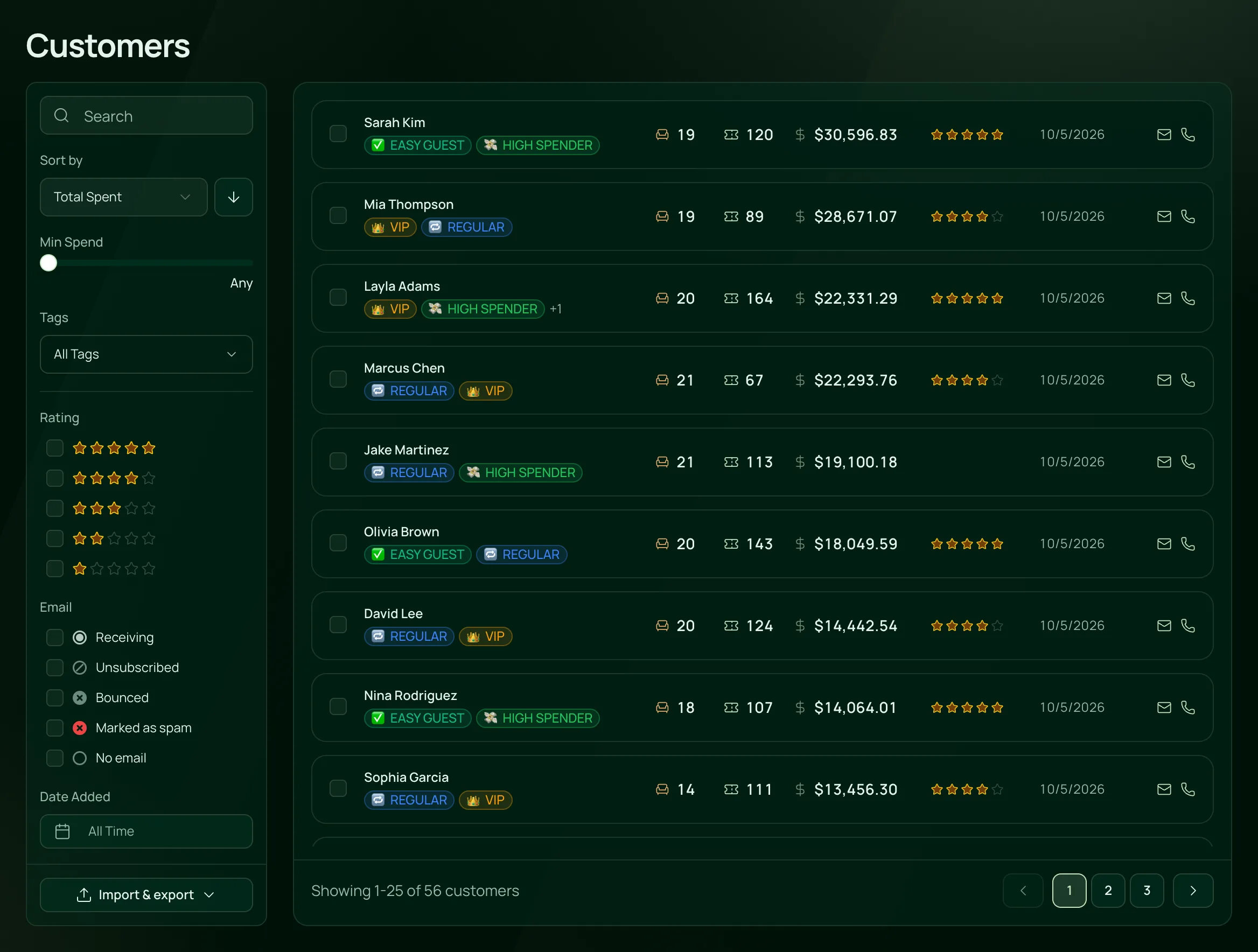
Every guest, ranked by what they spend
The customer list fills itself from every ticket, table and pass, with each guest’s tags, visits, spend and rating beside their name.
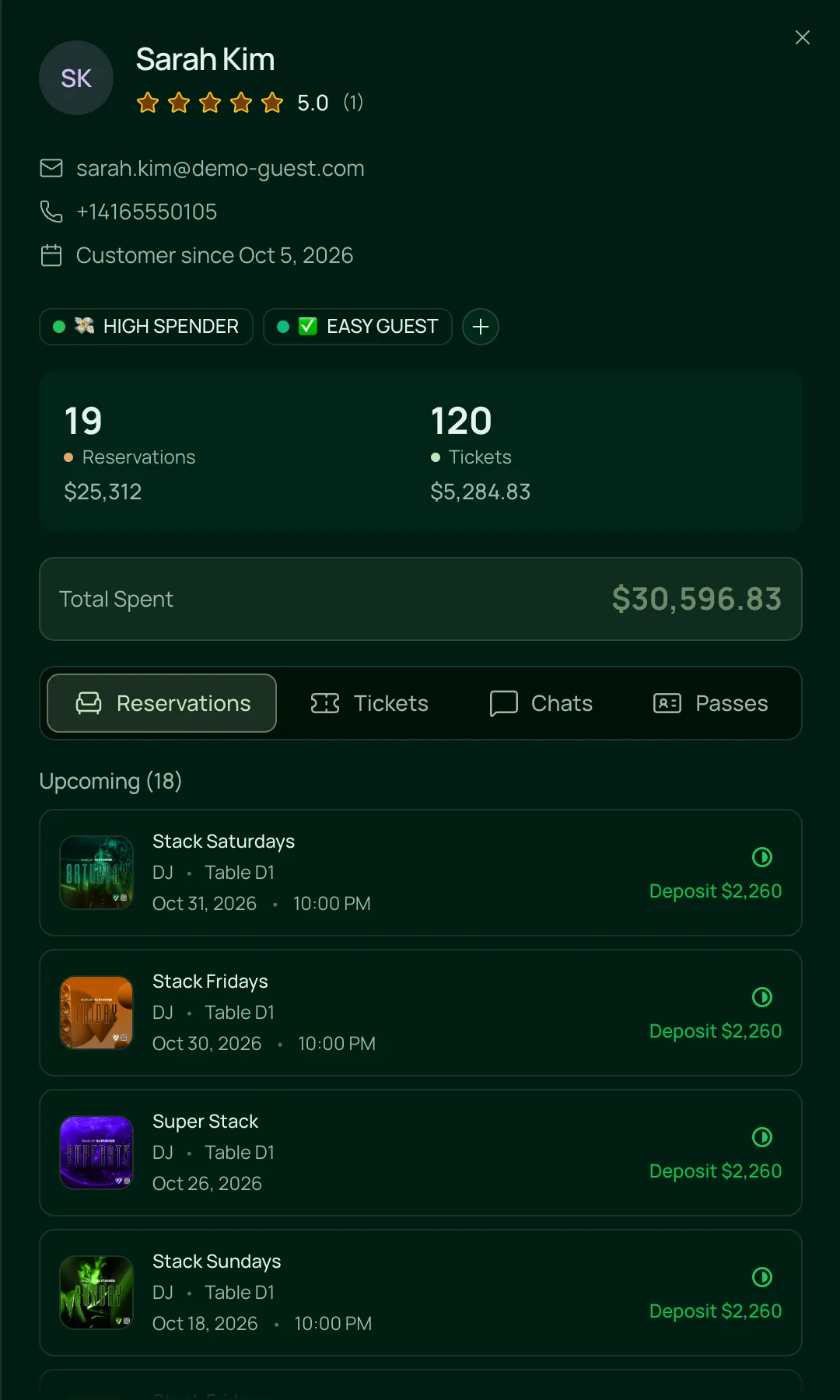
One profile for the whole relationship
Contact details, rating and tags, every reservation and ticket with what it brought in, and the deposits on bookings still to come.

Everything in the customer list.
Guest profiles, tags and history, on the one plan.
Profiles
Profiles
Total spent, split into tickets, tables and passes, with the date they became a customer.
Reservations, Tickets, Chats and Passes tabs, each item opening the booking, order, chat or pass itself.
Each completed visit can carry a 1 to 5 star rating and written feedback, and the profile shows the guest’s rating.
Receiving, Unsubscribed, Bounced or Marked as spam, beside the email. Unsubscribe a guest who asks, across every email they’ve booked with.
Hover over a name, email or phone and click the pencil to correct it.
Tags and notes
Create tags such as VIP or High Spender, and rename, recolour or delete them for every guest at once.
Tag a guest from their profile, a reservation, a ticket order or when you complete their visit.
Notes on a reservation show who wrote them and can’t be edited later.
Leave a note on a guest’s chat that only your team sees.
Finding guests
Find a guest by name, email or phone.
Min spend, tags, email status, rating and date added, sorted by what matters to you, such as total spent.
On the night, click a guest’s name on the table card to see their past visits, tickets and tags.
Type a name into a new reservation and past guests come up to choose from.
Import, export and accounts
Download every customer as a CSV, with their email status and the passes they bought.
Bring guests in from another system with the import template. Name is the only column you must fill.
Turn exports off for any role with Disable exports.
Owners can erase a guest’s personal details for good, while your sales and event totals stay the same.
Guests sign in with their email, with no password, to see their tickets, bookings and passes at your venue.
For rooms that know their regulars.
- NightclubsVIPs and high spenders tagged, and a regular’s past tables a click away on the table card.VenueStack for nightclubs
- LoungesRatings, feedback and notes from every visit, for rooms that run on regulars.VenueStack for lounges
- Event venuesOne customer list across every event, with what each guest bought and spent.VenueStack for event venues



On the one plan.
Guest CRM comes with every other feature on one published price, with a free trial before you pay.
One plan. Everything included.
Every feature on every account, and you can cancel whenever you like.
- Event calendar widget
- Ticket sales
- Table management
- Deposits
- Add-ons
- Passes
- Email campaigns
- Reporting
- QR door check-in
- Guest profiles
- Branded public pages
- Team roles and permissions
Questions, answered.
More questionsA customer list built from what guests do at your venue: what they bought, when they came and what your team knows about them. In VenueStack it fills itself from tickets, table bookings, passes and chats.
No. Every ticket order, table booking, pass purchase and chat adds the guest. You can also import guests from another system with a CSV, and anyone already on your list is updated instead of added twice.
Yes. On the Tables page, click the guest’s name on the table card to open their profile, with past visits, tickets, tags and contact details. Roles without access to Customers see the booking’s details instead.
Yes. Export every customer as a CSV whenever you like, with their contact details, email status and the passes they bought. You can turn exports off for any role.
No. Spend on a profile covers the tickets, tables and passes sold through VenueStack. The bar tab stays on your till, since VenueStack doesn’t connect to a POS.
Yes. Guests sign in with their email, with no password, to see their tickets, bookings and passes at your venue, pay a deposit you asked for and check out faster.
It’s included in the one VenueStack plan, with every other feature, and there’s a 14-day free trial. The price is on our pricing page.
Keep reading.
The features next to guest crm, and the guides behind it.

Your next event starts here.
Sell tickets, book tables and check guests in from one place.