Loading articles…
Loading articles…
Run a guest list
Updated
A guest list lets people in free on a night, once you approve them. Names come from your promoters, and from guests on your ticket page if you allow it. Each approved guest gets their own QR code, and the door scans it like a ticket.
Turn it on for a night
- Open the event and go to the Guest list tab.
- Turn on Take guest list names.
- Under Sign-ups close, choose At the start to stop taking names when the night starts, or Set a time and pick a time.
- To let guests ask to join from your ticket page, turn on Show on your event page.
- Click Save.
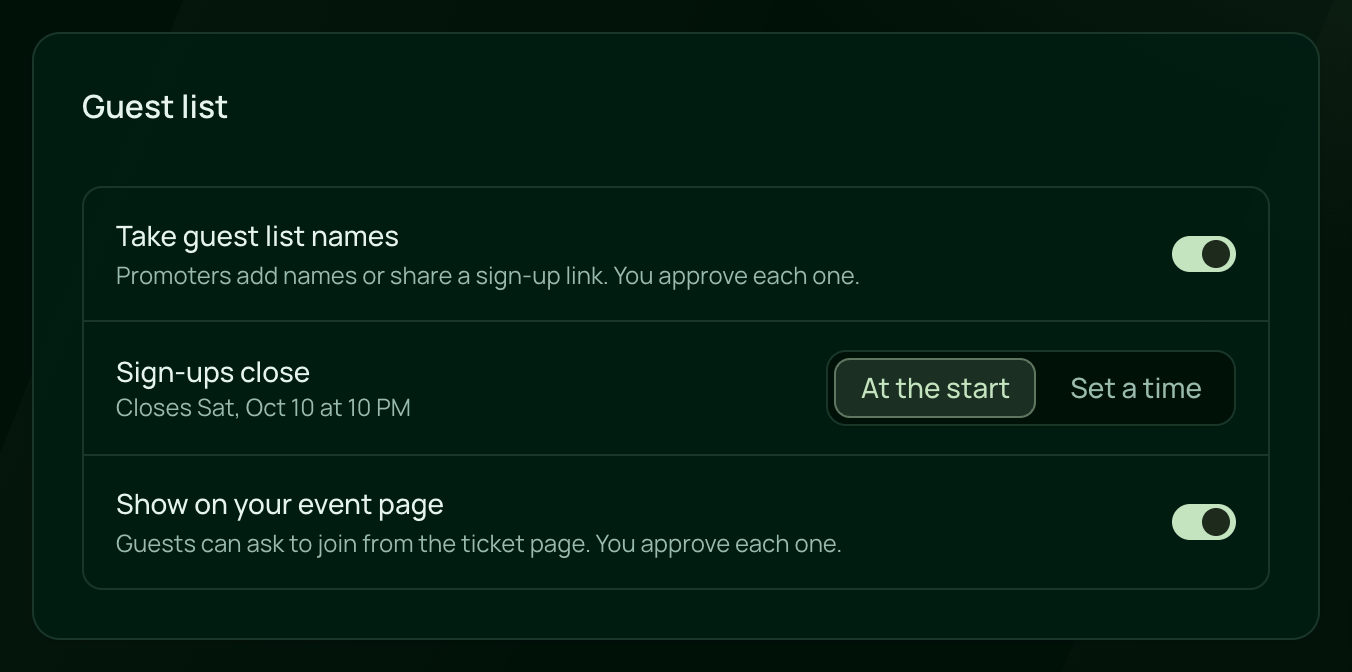
The list opens once the event is Published. A closing time earlier than the start, such as 1 AM for a 10 PM night, means the morning after.
Where names come from
- Promoters type them in on their own dashboard, with an email for the QR codes or without one.
- Guests sign up through a promoter's link, with a name and email for themselves and for each friend they bring.
- Guests tap Join the guest list on your ticket page, when Show on your event page is on.
See How guests join the list. Every name waits for you on the Guest List page until you approve it. See Approve guest list names.
To limit how many guests each promoter brings, or to pay them per guest who arrives, see Promoter pay and access.
At the door
Scan each guest's QR code as you would a ticket. It shows as Guest list. A name without an email has no QR code: find it by name on Tickets and check it in by hand. See Check guests in.
Guest list places are free, so they stay out of your ticket sales and the ticket report. The promoter report counts them, with how many guests arrived.
 VenueStack on your phoneRun your venue from your pocket.How to install