
Digital guest list data privacy compliance starts with knowing where guest information goes before, during, and after an event. A reservation form, promoter upload, door tablet, and next-morning spreadsheet can each create another copy. For venue operators, the practical task is to check collection, permissions, storage, and deletion before those copies spread. Use this checklist to document readiness, assign unresolved issues, and give staff clear instructions. Have a qualified privacy adviser confirm legal applicability and requirements.
Establish which privacy rules apply to your guest list
A guest list review needs a documented legal scope before anyone marks the event ready. Record who completed that assessment and when it needs another review.
Check state coverage and international activity
For US operations, ask your adviser to assess the California Consumer Privacy Act, as amended by the California Privacy Rights Act, alongside other relevant state privacy laws. Include guest residency, business thresholds, exemptions, and how the venue uses personal information.
For GDPR exposure, document where the business operates, whether it targets people in the European Economic Area, and any relevant monitoring activities. Ask counsel to assess those facts rather than treating an international passport as the deciding factor.
Keep the assessment with the event’s privacy records. Revisit it when the business enters another market, adds a marketing partner, or changes its collection practices.
Run these seven checks against the actual event
Use one short audit record with an owner, evidence, and an unresolved issue for each check:
- Record the applicable privacy requirements and who confirmed their scope.
- List every guest-data field and remove fields without a defined purpose.
- Test signup notices and save evidence of any required choices.
- Verify staff and promoter access using accounts assigned to those roles.
- Identify stored copies, connected vendors, and permitted data uses.
- Assign retention periods and a process for guest privacy requests.
- Test door devices, fallback lists, and the response to lost access or equipment.
Mark each check ready, needs correction, or pending legal review. An unchecked assumption stays pending. Keep the affected collection, sharing, or marketing activity disabled until its owner resolves the issue.
Keep only the guest data the night needs
Every field on the guest list should support a named task. Review the booking form, customer profile, imported spreadsheet, and door screen separately; they may contain different information.
A name may support admission. A booking reference may connect a guest to a table. An email address may support booking communications. For each field, write down its purpose, whether it must be required, and who needs to see it.
Challenge requests for full birth dates, home addresses, identity-document images, and open-ended personal notes. Where age verification is necessary, assess whether a limited verification result can meet the need without retaining a document copy.
Free-text notes deserve a separate pass. Give staff examples of acceptable operational notes, such as an agreed arrival arrangement. Set rules for handling accessibility requests and other potentially sensitive information.
If your team uses VenueStack, include the venue customer list in this inventory alongside event-specific records and exported files. Check what persists in a guest profile after an event closes.
The finished record should connect each field to a purpose, an access group, and a retention decision. Remove duplicate fields and unexplained notes before opening registration.
Make signup choices match what happens afterward
The guest-facing form should explain the data use that actually follows registration. Inspect the experience on a phone, including embedded forms, confirmation screens, and linked notices.
Separate booking needs from promotional choices
Distinguish the information needed to manage a booking from optional uses such as future event marketing or partner promotions. Ask your adviser which legal basis, notice, consent, or opt-out mechanism each use requires.
Avoid treating acceptance of booking terms as permission for every later use. Review email and text-message marketing separately, including any applicable communications rules. Keep optional promotional choices clear and unselected as a practical form-design default, subject to legal review.
A guest who declines promotions should still have a clear booking path when those promotions are optional. Test that path through confirmation.
Save evidence of the choice
Where consent is required or used, confirm that the record identifies the guest, the choice, when it was made, and the wording shown. Preserve the relevant notice or form version so the record has meaning later.
Include these checks in your reservation widget setup review. Inspect the live page rather than relying on a screenshot from initial setup.
Repeat the test for promoter links and imported registrations. A blank marketing field should not silently become an affirmative choice during import.
Check withdrawal and unsubscribe paths as well. Confirm where the updated preference appears and which connected systems receive it. Save a test registration and its resulting preference record as evidence.
Limit staff and promoter access to the job
Guest list access should reflect what someone needs to do during the event. Compare the permissions in the software with the shift roster and promoter agreements.
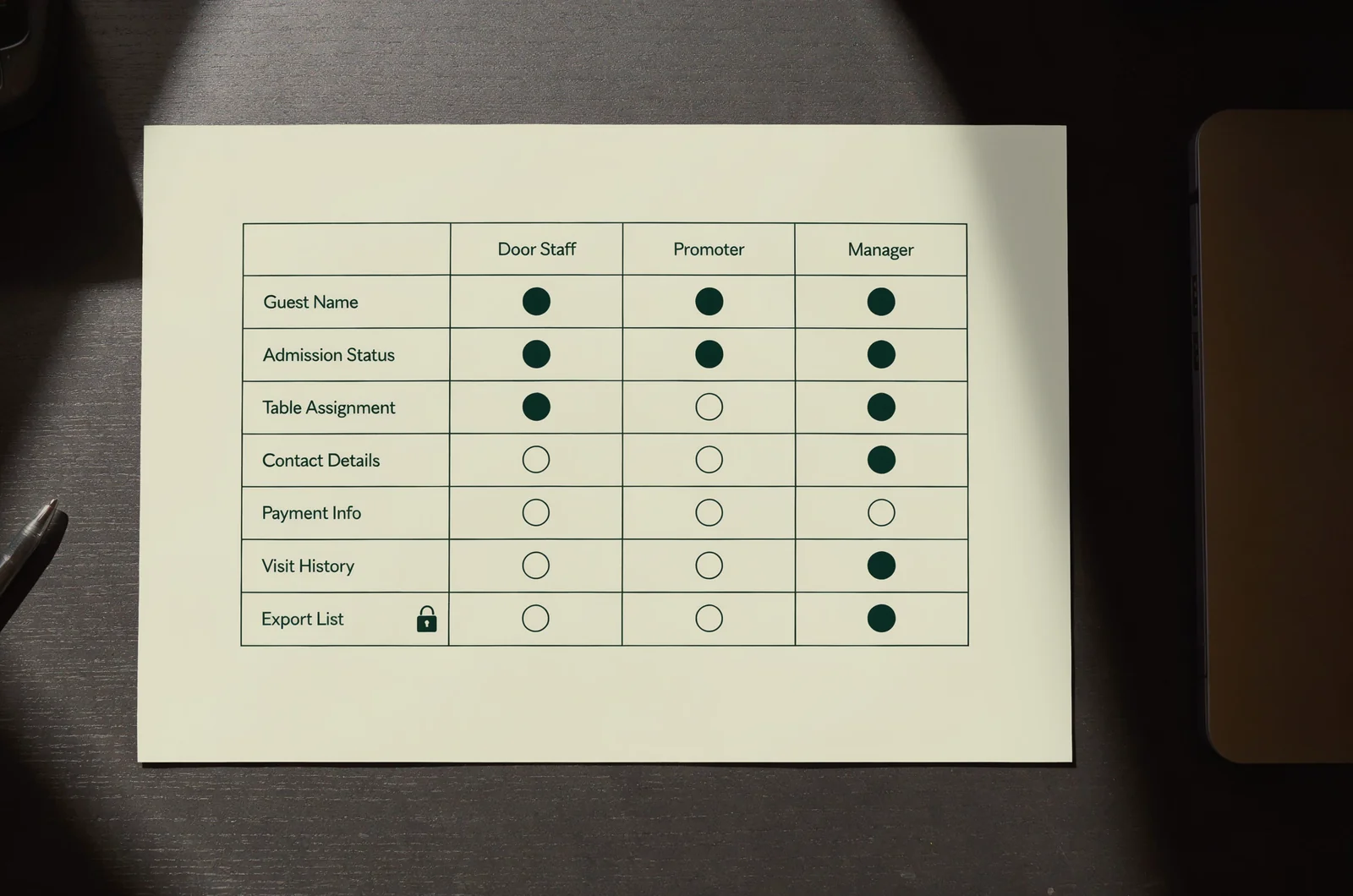
Door staff may need names, admission status, ticket validity, and table assignments. Assess whether they need contact details, payment information, historical visits, or private booking notes. Reporting staff may need totals without an unrestricted guest export.
Use individual accounts where supported. Check who can view, edit, download, invite users, or change permissions. Give temporary workers an access end date and assign someone to remove access after the shift.
For promoters, define whether visibility covers their own allocation, their submitted guests, or a wider list. Keep that decision separate from commission calculations. Your promoter ticket allocations process should specify which guest details accompany sales reporting.
Where the platform supports separate roles, test a door account and a promoter account directly. Attempt a search outside the assigned event, an export, and access to a guest profile. Record the result.
If permissions cannot be narrowed enough, change the handoff. A restricted admission report may meet the task better than full account access. Include screenshots, messaging apps, and printed lists in the staff rules; software permissions cannot control a photo of the screen.
Trace stored copies and review vendor permissions
The guest list review should follow information beyond the main account. Map each destination from signup through post-event reporting.
Locate exports, caches, and connected services
Include booking software, payment providers, email platforms, promoter files, shared drives, downloaded reports, device storage, and paper backups. Record who controls each location and how access ends.
For offline check-in, ask what the device stores, whether the information is encrypted, and how the cached copy is removed. Use an offline ticket scanner review to assess those questions alongside scanning performance.
Confirm that the fallback process uses a defined, restricted location. Staff should know which copy is current and where updates must be entered.
Read the terms behind data control
For each vendor, identify its contractual role, permitted purposes, subcontractors, storage arrangements, and support access. Ask how the agreement addresses security incidents, guest requests, deletion, exports, and account closure.
Pay particular attention to independent marketing, advertising, profiling, and onward-sharing permissions. Send unclear terms for review before approving that use.
Apply the same questions to VenueStack guest lists, booking widgets, and any connected services. Keeping records in the venue’s account gives the inventory a starting point; document what the relevant agreements permit.
A booking widget comparison can help frame the distinction between booking channels, but the contract must answer the privacy questions. Save the agreement version and vendor responses with the audit.
Give every record a retention decision and request path
A guest list needs a plan for what happens after admission and reconciliation. Set retention periods by record category rather than keeping every field indefinitely.
Separate event operations from continuing records
Distinguish admission records, booking communications, financial records, incident records, and marketing preferences. Ask the responsible adviser or finance owner to confirm applicable retention duties and exceptions.
Choose periods based on a documented purpose. Financial or dispute-related retention does not automatically explain why unrelated guest notes should remain in every operational view.
Identify the owner of each deletion task and the systems it covers. Include exports, shared folders, staff devices, and paper copies. Ask vendors how deletion works in backups and what happens if a backup is restored.
Rehearse a guest request
Give staff a clear route for requests about access, correction, deletion, marketing preferences, or other applicable rights. A guest may raise the issue through a booking reply or at the host stand.
Assign someone to record the request, verify identity proportionately, identify affected systems, and apply the relevant deadlines and exceptions. Avoid collecting extra identity documents without a justified need.
Run a rehearsal using a test record. Follow it from the customer account into exports and connected services, then document any limitations.
Where a suppression record is needed to preserve an opt-out, review its minimum contents and access restrictions. Explain the result to the guest through an approved response. Keep the request log separate from the door list.
Check the door setup before guests arrive
The final event check should confirm that the planned controls survive a busy entrance. Use the devices, accounts, and fallback materials assigned to the shift.
Check screen locks, session access, available updates, and the venue’s rules for personal devices. Position screens so waiting guests cannot read neighboring records. Keep printed backup lists behind the desk and assign someone to collect them afterward.
Search for a guest, check them in, correct a booking, and handle a duplicate entry. Confirm that staff can complete those tasks within their assigned permissions. If the test requires a manager account, resolve the access design before opening.
Name the person staff should contact for a lost tablet, exposed export, or suspicious login. Keep instructions for revoking access, preserving relevant logs, and escalating the incident available during the event. Have the responsible adviser assess any notification obligations.
An interactive version of this checklist could collect the event name, owner, evidence, and unresolved items, then generate a shift handoff sheet. It should flag missing evidence rather than issue a legal compliance score.
Record who completed the final check and when. Add access removal, export cleanup, and backup-list collection to the post-event handoff so those tasks have an owner.
Privacy questions that come up during event planning
These guest list questions deserve a recorded answer before staff improvise at signup or the door.
Can a promoter upload an existing contact list?
Ask where the records came from, what guests were told, and what permissions or other legal grounds support the proposed use. Establish whether the upload supports admission, booking communications, or marketing.
Review the import fields and preference mappings before accepting the file. Keep uncertain promotional permissions out of marketing audiences until reviewed.
Does publishing a privacy policy cover signup consent?
Review the notice and any consent mechanism as separate parts of the form. Confirm what information guests must receive and whether a particular use needs an affirmative choice or an opt-out.
Test whether the saved record reflects that choice. A policy link alone does not show what a particular guest selected.
Should the venue delete everything immediately after the event?
Apply the approved retention schedule and any valid hold or exception. Different records may have different purposes after closing.
Start the scheduled cleanup of temporary door copies and unnecessary exports. Keep retained records under the access rules assigned to their continuing purpose. Document exceptions with a reason, owner, and review date rather than leaving them open-ended.