QR code check-in for events can read a ticket correctly and still produce a bad admission decision. A forwarded screenshot gets through twice. Three guests arrive against a table booking for eight. Two scanners lose their connection and work from different records. Meanwhile, the line waits for one staff member to resolve everything on one phone.
For nightclub owners, festival operations leads, and beach club managers, reliability depends on what happens around the scan. The useful layers are ticket validity, shared admission status, group allowances, device availability, and exception handling. Each needs an operating rule that staff can apply while guests are waiting.
The admission record decides what a scan means
A QR code carries data that a scanner can read. For ticketed entry, that data usually identifies a ticket or points to its record. Reading it is the first part of admission.
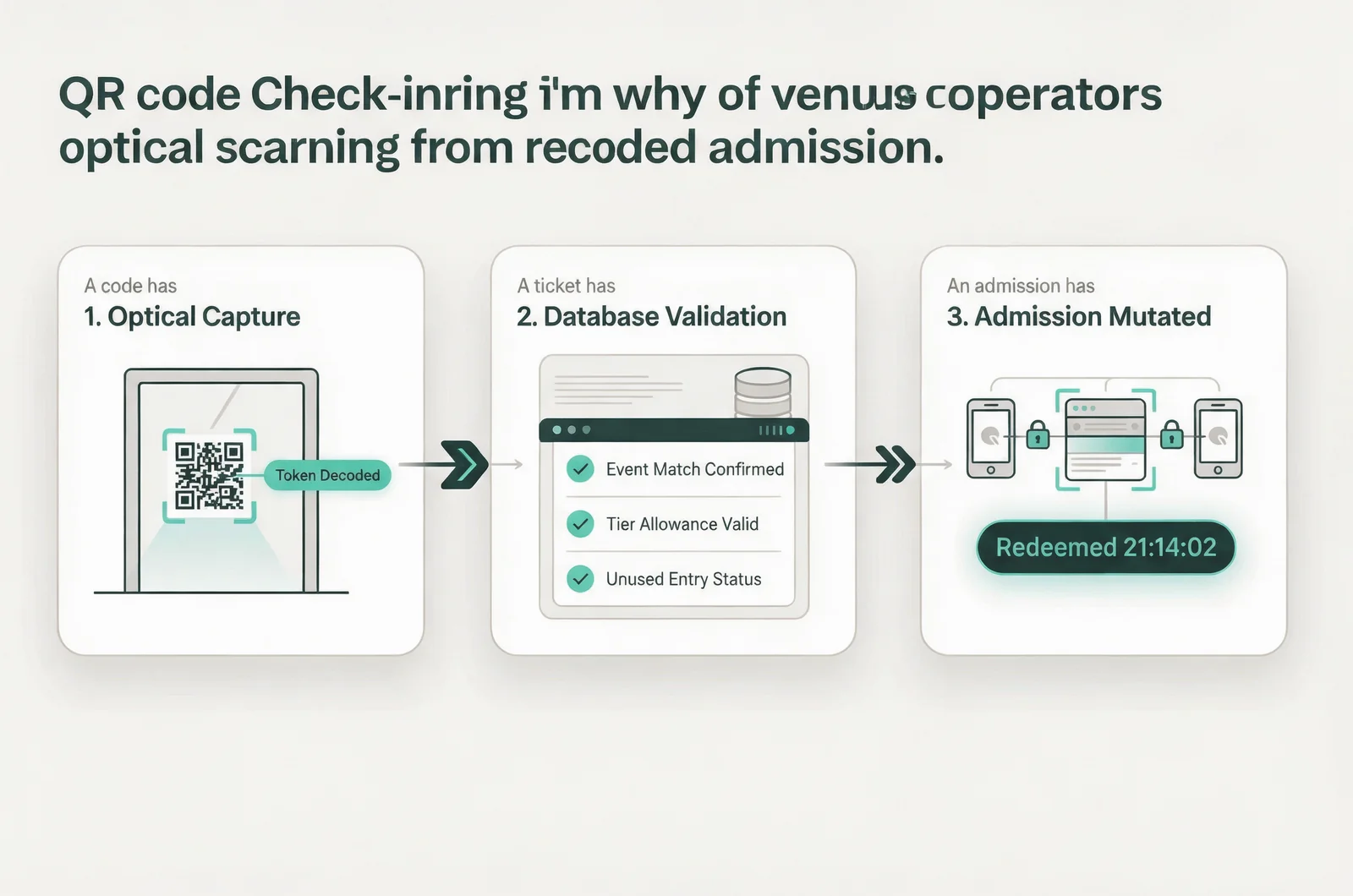
The system then needs to establish whether the ticket belongs to this event, whether it remains valid, and whether its entry allowance has already been used. A successful admission must also update the record that other door staff rely on.
QRCodeChimp presents ticket generation and check-in together on its product page. That connection gives operators a useful starting point: follow a ticket from issue through admission, then examine what happens when someone presents it again.
For a team using VenueStack, its ticket check-in workflow is the place to establish the normal admission process. Document exception decisions alongside it.
Keep these states separate:
- A code has been read.
- A ticket has been found and validated.
- An admission has been recorded.
A camera response confirms that the scanner recognized something. Staff need an unambiguous admission result before letting the guest through. During a rehearsal, ask each operator to identify the result that authorizes entry and the result that requires a supervisor.
Screenshots expose weak duplicate handling
A copied ticket becomes a door problem when the team cannot distinguish an unused entitlement from one already redeemed.
A screenshot carries the same entitlement
For a ticket with a static QR code, a screenshot preserves the code. It does not create another admission allowance. A guest may legitimately save their ticket as an image, provided the ticket system accepts that format.
The difficulty starts when the same image reaches several people. If one person enters first, the next presentation needs a clear repeat-scan result.
Duplicate detection also cannot establish who should rightfully hold a forwarded ticket. The first person to present it may have received an unauthorized copy. Staff need a separate dispute process based on the booking record and the venue’s transfer rules.
Move that dispute away from the scanning position. Keep the guest’s ticket details available to the person handling it.
Parallel doors need a shared redemption status
A repeat-scan warning on one phone does not establish how two phones behave together. Check that a successful admission updates the status available to other scanners.
Present the same test ticket at two devices close together. If both approve a single-entry ticket, resolve that behavior before relying on parallel admission.
Review your ticket management settings alongside cancellation, transfer, and re-entry rules. Re-entry deserves its own process: clearing the original arrival can make the ticket appear unused again.
Record authorized exceptions with the reason and approving staff member, so the next scanner has context.
Table groups need individual arrival counts
A table reservation connects a booking to a group. The door still has to account for the people who actually arrive.
One booking can produce several arrival waves
Say a table package includes admission for eight guests. Three arrive first and show the reservation code. Five more arrive later.
If the first scan marks the entire booking as arrived, the host loses the distinction between three admitted guests and eight. If every presentation admits another full group, the allowance can be exceeded.
The operating record should distinguish the booking allowance, the number admitted, and the number remaining. In this example, the first arrival leaves five admissions available.
Decide whether guests receive individual tickets or present a shared booking identifier. Either approach needs a rule for partial arrivals and a way to check the remaining allowance.
VenueStack’s event table rules are a relevant reference when aligning reservation terms with door instructions. Confirm what admission the package includes before explaining it to staff.
Arrival and seating are different events
The door may have admitted three people while the table remains unoccupied. Those guests could still be waiting for their host or other members of the party.
A single checked-in flag cannot explain that situation. The door and floor need enough shared information to distinguish a partial arrival from a seated group.
Set a policy for whether late guests may enter without the booking holder, who can approve additional guests, and when an unoccupied table may be released. Communicate arrival deadlines before the event.
At the door, count people against the allowance. On the floor, record whether the group has taken its table.
Offline scanners can disagree about the same ticket
Connection loss changes what each scanner can know. The important question is which admission decisions remain reliable when devices stop exchanging updates.
Downloaded tickets and shared status are separate
An offline roster is a saved copy of ticket information. A device may be able to find a ticket in that copy and record an admission locally.
Another disconnected device may still see the same ticket as unused. Until those records meet, each scanner can be working from a different version of the event.
There are three capabilities to distinguish:
- The device can access ticket details without a connection.
- It can save admissions while disconnected.
- Other devices can receive those admissions.
Treat each as a separate question. Check the documented behavior of the system you use, including how it handles conflicting records after reconnection.
A downloaded roster can also become stale. A cancellation or late sale made after the download may be absent. Record when the roster was last refreshed.
The fallback needs one agreed source of admission status
If disconnected devices cannot share redemption status, choose a fallback that reduces overlap. Where practical, assign separate ticket batches to specific lanes. Another option is to concentrate admission recording on one designated device while other staff prepare guests and handle inquiries.
Either choice affects queue capacity. Rehearse the fallback at the entrance, with the devices and connections staff will actually use.
Agree who declares the switch, what staff tell waiting guests, and how manual admissions are recorded. A paper tally needs ticket identifiers or booking references if it will later be reconciled with digital records.
After connection returns, confirm that saved admissions have synchronized before treating the shared count as complete. Escalate conflicting records to a supervisor rather than deleting them to make the totals agree.
One phone can become the whole door’s bottleneck
A scanner’s workload includes everything its operator must do between guests. Camera speed tells you little if that person also searches names, checks reservations, answers questions, and approves exceptions.
Measure the full admission cycle
Use a hypothetical arrival wave of 240 guests over 20 minutes. That is 12 arrivals per minute.
If the complete admission cycle takes 10 seconds per guest, one position can process six guests per minute. Two positions match that assumed arrival rate exactly, leaving no room for delays.
These are planning inputs, not measured performance figures. Replace them with timings from your own entrance, including the pauses between scans and the handoff to security or the host.
A small staffing calculator could use expected arrivals per minute, measured cycle time, and active scanning positions. It could flag periods when estimated demand exceeds processing capacity.
Adding phones helps only when staff, shared ticket status, and the space beyond the scanner can support another lane.
Give exceptions somewhere else to go
Separate routine scanning from booking problems where staffing allows. A missing ticket, transfer dispute, or table allowance question needs time and access to the relevant record.
An exception position also needs clear authority. Otherwise, it becomes another queue waiting for the same manager.
Prepare a charged replacement device with the correct login and permissions. Use the pass scanning guidance to confirm the scanner setup and camera access.
Rehearse a device handover before opening. The replacement operator should be able to continue without borrowing the phone used for reservations or guest messages.
Unclear scan results invite inconsistent overrides
A door result needs to tell staff what happened and what they may do next. A vague response leaves the operator guessing while the guest expects an answer.
A successful result should clearly distinguish a new admission from an already-used ticket. Where available, previous admission details can help a supervisor investigate a repeat presentation.
A wrong-event result needs a different response from a missing ticket. The guest may have opened another date’s confirmation, which can be resolved without treating the booking as invalid.
A pending result means the decision is still unresolved. Staff should know whether to wait, retry, search the record, or use the agreed fallback. Repeatedly tapping without understanding the state can create more uncertainty.
Use readable text and distinct visual states. Sound can support the result, but the operator may miss it in a noisy entrance. Color alone can also be difficult to interpret.
Assign override authority to a named role for that shift. Require a reason whenever someone admits a guest despite an unresolved or rejected result.
Keep the original result available where possible. The record should explain both what the scanner reported and why staff chose to admit the guest.
Door errors reach the floor and the morning report
Check-in records influence decisions beyond the entrance. An inaccurate arrival status can affect table handling, guest service, and the attendance figures reviewed after the event.
Ticket sales, admissions, and current occupancy measure different things. A sold ticket may remain unused. A guest may enter through an authorized manual process. Someone who checked in may later leave.
Occupancy therefore needs an agreed process for departures and other admissions as well as ticket scans. Use the venue’s occupancy process when controlling entry, and understand which people the scanning total includes.
VenueStack brings ticketing, table bookings, guest lists, check-in, and reporting into one system. In that setting, assess the event ticketing setup against what the door and floor need to reconcile afterward. Connected records still depend on consistent staff actions.
Partial groups need particular attention in no-show reporting. A booking for eight with three arrivals should remain distinguishable from a booking with no arrivals. Apply the venue’s arrival deadline before classifying the reservation.
After the event, review accepted admissions, repeat-scan results, manual exceptions, and the busiest queue period. A repeat scan is a result to investigate; it does not by itself establish attempted fraud.
When comparing nights, use the same definitions and comparable arrival periods. Check unresolved device records and manual admissions before using the attendance total to judge sales performance or staffing.
Door questions to settle before opening
Some arrival problems need a policy decision before they reach a scanner. Give staff answers they can apply without inventing terms at the entrance.
What happens when a guest’s phone is dead?
Use an authorized lookup process to locate the booking. A name alone may match several records, so staff need an agreed way to identify the correct ticket.
Check its admission status before recording entry. A booking confirmation establishes that a purchase existed; staff still need to resolve whether its entry allowance remains available.
Keep this lookup away from routine scanning whenever staffing permits.
Can a table guest enter before the booking holder?
That depends on the reservation terms and the venue’s operating rule. Decide whether the booking holder must arrive first, what information another guest must present, and who may approve an exception.
The admission still needs to count against the group’s remaining allowance. Tell guests the rule before arrival, especially where party members are likely to reach the venue separately.
Who can correct an accidental check-in?
Give that authority to a supervisor or another designated role. First establish whether the guest actually entered and whether another device has recorded related activity.
A correction should preserve enough context to explain the original admission and the change. If the software cannot retain that history, keep an accompanying incident record with the ticket reference, time, staff member, and reason.
Include corrections in the post-event reconciliation rather than relying on staff memory the next morning.