If you need card on file for event deposits explained, start with the money: saving a card is different from collecting a deposit. This guide helps venue managers define charge permissions, cancellation deadlines, and booking records for tables and private hires.
Have your booking form, payment-provider settings, cancellation terms, and confirmation message available. Your finished setup should let a guest understand the payment conditions before agreeing. Staff should then be able to retrieve that agreement and check whether a charge is due.
Treat the examples below as drafting aids. Have the proposed charges and authorization wording reviewed for your jurisdiction and payment setup before launch. Clear terms support consistent enforcement, but they cannot guarantee legal enforceability, successful collection, or a favorable dispute outcome.
1. Choose between a deposit, a hold, and a saved card
Start your policy by selecting the payment arrangement for each booking type. That choice determines what guests authorize and what staff record.
A paid deposit, an authorization hold, and a stored card create different booking records:
| Arrangement | What happens at booking | What staff must track |
|---|---|---|
| Paid deposit | The guest makes a payment | Amount received, refund conditions, and any credit toward the final bill |
| Authorization hold | An amount may temporarily reduce available funds or credit | Authorized amount and the provider’s capture and expiration conditions |
| Card on file | Card details are saved through the payment provider for an agreed purpose | Permission for future charges, including their amount or calculation and trigger |
For a table booking, decide whether you need money upfront or permission to collect a specified fee later. The choice between partial versus full deposits belongs here, before staff configure payment collection.
If a deposit will be collected later, give that payment its own amount and due date. Keep its authorization separate from any cancellation fee.
Write the selected arrangement into the booking specification. Include how any money collected will affect the final balance.
Check the result by asking a staff member two questions: Has the guest paid anything? What further payment have they authorized? Both answers should be clear from the reservation.
2. Write the charge amount and cancellation clock
Turn the stored-card agreement into a payment condition that staff can check against dates, amounts, and booking status. Vague wording leaves too much for the shift manager to interpret.
Specify each deadline separately
Define the cancellation deadline with a date, time, and named time zone. Also decide how guests cancel and where staff record receipt.
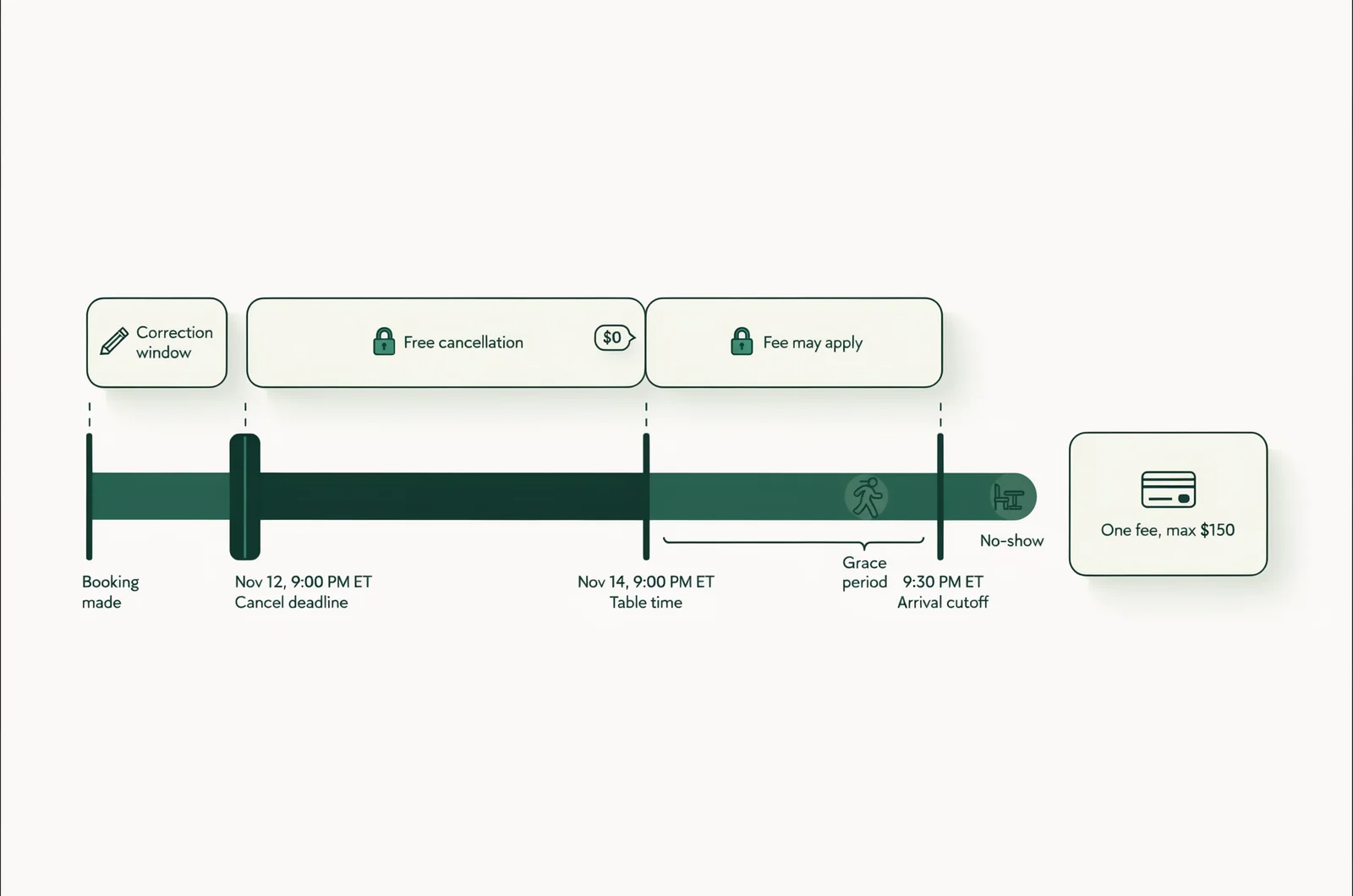
Separate these three periods:
- A booking correction window, if you allow guests time to fix an accidental reservation.
- The free-cancellation period, after which a stated fee may apply.
- The arrival grace period, after which staff may classify the booking as a no-show.
Explain how these periods interact. For reservations made after the cancellation deadline, show the applicable conditions before acceptance.
For private hires, list deposit due dates, balance dates, and cancellation conditions separately. A signed booking contract should not leave staff guessing which payment becomes due when.
Show the guest the complete payment condition
Use one hypothetical table booking to check your wording. Suppose a reservation starts at 9 p.m. on November 14, with a $150 conditional cancellation or no-show fee.
A drafting example for review could read:
No payment is collected today. You authorize a charge of $150 if you cancel after 9 p.m. on November 12, in the venue’s stated time zone, or if your party has not arrived by 9:30 p.m. on November 14. The maximum charge under this cancellation and no-show authorization is $150 per reservation. Cancel through the method shown in your confirmation. No cancellation or no-show fee applies if the venue cancels your booking.
This arrangement is a card guarantee with a conditional fee. Label it that way in the booking form.
If you collect a deposit instead, state what happens to the amount already paid and whether any further charge is authorized. Review your broader event deposit policy wording alongside this payment permission.
Before proceeding, confirm that every possible charge has an amount, a trigger, and an identifiable authorization.
3. Collect agreement before confirming the reservation
Present the payment terms while the guest can still decide whether to book. The confirmation should preserve what they accepted.
Keep the agreement attached to the booking
Place the payment summary beside the acceptance control. Use a clear affirmative action, such as an unchecked agreement box, followed by the booking submission.
Save enough information to reconstruct that moment:
- The reservation identifier and booked event.
- The exact policy version presented.
- The guest’s acceptance action and timestamp, with time-zone context.
- The accepted charge amount or calculation, trigger, and limits.
- The payment-provider reference and confirmation sent to the guest.
Retain the accepted wording. A link to a policy page that changes later makes the original agreement harder to establish.
Use your provider’s secure payment form or payment link. Keep raw card numbers and security codes out of reservation notes, spreadsheets, messages, and screenshots.
Where supported, retain a processor token: a reference the payment system uses for the saved card. Keep that reference connected to the reservation and the specific permission obtained.
Give phone bookings the same acceptance path
Send phone and message bookings through a written agreement and secure payment process. Have the person authorizing use of the card complete that step before staff mark the booking confirmed.
For a private hire, the organizer and payer may be different people. Connect the payer’s authorization to the relevant booking and payment schedule.
Use a short explanation for deposit conversations with guests: tell them what is collected now, what may be collected later, and when cancellation becomes chargeable.
Open a completed reservation and retrieve the accepted wording, timestamp, and payment reference before continuing.
4. Match your booking settings to the policy
Translate each payment condition into a supported setting or a documented staff action. A written deadline only helps operations when the booking process follows it.
Map each condition to a control
For a team using VenueStack for table bookings and deposits, start with the event table rules guide. Confirm which controls your account and payment provider support before relying on automation.
Map the policy to the booking process:
- Display the correct payment arrangement for the selected event and table.
- Show the cancellation deadline in the stated time zone.
- Require agreement before confirmation.
- Apply the correct deposit credit or conditional fee.
- Send a confirmation containing the accepted conditions.
- Record cancellations, attendance, exceptions, and payment outcomes.
If a required control is unavailable, assign a reviewed manual procedure. For example, a manager might verify eligibility before an authorized charge. If the available setup cannot support the intended permission, revise the payment flow before launch.
The expected result is one mapping sheet showing how every policy condition will operate.
Control exceptions and failed payments
Assign responsibility for charging cards, approving refunds, and recording waivers. Use separate permissions where the software supports them.
Define what staff do after a failed payment or a request for further cardholder authentication. Set any retry process within the guest’s authorization and provider-supported workflow.
Specify who can override a fee, the reason they must record, and how that decision reaches the next shift.
Verify the setup using the accounts staff actually use. Check that a host can identify a paid deposit, a saved card, a failed payment, and a manager-approved exception.
5. Check the booking before moving money
Review the reservation before submitting a charge, retaining a deposit, or issuing a refund. This is the point where an incorrect booking status can become a financial error.
First, confirm the guest’s accepted terms and the amount permitted. Then compare the cancellation or arrival record with the relevant deadline.
For the hypothetical $150 guarantee, check whether the guest canceled before the deadline through an accepted channel. Also check messages awaiting review, arrival records, and any approved exception.
Under that example’s wording, a late cancellation and a no-show do not produce two fees. The authorization caps collection at $150 per reservation.
Check for an earlier payment attempt before submitting another. A delayed response or an uncertain screen status needs reconciliation with the processor’s record.
After submission, record the result against the reservation. Keep an unsuccessful attempt marked as unresolved, with a named staff member responsible for follow-up.
If a paid deposit should reduce the final bill, verify that credit before collecting the balance. A saved card with no payment collected creates no deposit credit.
For a refund, check the original transaction and any previous partial refund. Use the provider’s refund process and send a receipt that identifies the amount returned.
Finish by confirming that the reservation status, payment record, and guest communication describe the same outcome.
6. Test the guest journey and save the evidence
Run sample reservations through the complete process before making the policy live. Use the payment provider’s test environment where available.
Test the boundaries where fees change
Check more than a successful booking. Test the conditions that change whether money is due:
- Cancel immediately before and immediately after the stated deadline.
- Book after the free-cancellation deadline.
- Arrive within the grace period and after it ends.
- Submit a booking when card setup fails.
- Change the reservation’s date, table, or payer.
- Apply a manager-approved waiver.
- Attempt to process a payment that already succeeded.
For each test, compare the displayed terms, saved agreement, staff view, and payment outcome. The hypothetical $150 booking should collect nothing at confirmation and permit no more than the single conditional fee described.
Changes deserve their own check. When a date or payment amount changes, review whether the existing authorization covers the revised arrangement. Obtain fresh agreement where needed before processing the changed payment.
A small interactive policy checker could help: enter the booking time, cancellation deadline, arrival grace period, and fee cap, then flag conflicting deadlines or duplicate fee triggers.
Build a record someone else can understand
Save an evidence bundle containing the booking confirmation, accepted terms, timestamp, payment references, relevant messages, and cancellation or attendance record. Include the reason for any exception.
The goal is a chronological account that another manager can follow without relying on the original employee’s memory. Apply your agreed access and retention rules to these records.
Use deposit chargeback prevention tactics to review the wider payment workflow. An acceptance record supports the explanation of a charge; it does not settle every possible dispute.
If your team uses VenueStack reporting, compare the available records with the processor’s transactions. Reconcile collected deposits, conditional fees, refunds, and failed attempts separately.
Approve launch only after a second staff member can retrieve the test agreement and explain every payment outcome.
Questions guests ask about keeping a card on file
Prepare answers that match the stored-card policy so reservations staff and managers explain the same conditions.
Does saving my card mean I have paid a deposit?
Answer from the transaction record. If no money was collected, say so and explain the authorized future charge. If a deposit was collected, state its amount and how it affects the remaining balance.
Will the venue automatically collect every later charge?
Explain the specific payment permission attached to the reservation. A saved card does not guarantee that a later payment will succeed. If collection fails or further authentication is needed, follow the documented payment process and contact the authorized payer.
Can the venue charge this card for damage or extra spending?
Keep the answer within the permission actually obtained. Review damage charges, additional spending, and other payment purposes separately before attempting collection. Give staff access to the applicable agreement.
What happens if I question a charge?
Give the guest a booking reference and a clear route for review. Have the responsible manager compare the accepted terms with the cancellation, arrival, and transaction records.
If the venue made an error, correct it and document the result. If a formal dispute arrives, preserve the relevant evidence and follow the processor’s response instructions and deadline.