Double booking prevention for venue tables starts with a rule every sales channel must obey: a table already committed to one party cannot be promised to another for the same period. That sounds straightforward until an online guest checks out while a host takes a deposit and the door manager seats a walk-in. Preventing that collision requires a shared inventory record, an enforceable hold, and clear authority to release it. This guide explains how those controls fit together across presales, bottle service hosts, promoters, and the door.
Give every table one event record
A table needs one identity across every place your team sells it. The website, reservations desk, and door should all claim inventory from the same event record.
Consider a hypothetical lounge with 12 tables. A guest sees Table 8 online, a host calls it the corner booth, and the door sheet labels it VIP B. Staff can follow the same booking procedure and still sell that space twice if those names represent separate inventory.
Give each physical table a stable identifier. Connect reservations to that identifier, the event, and the booking period. With VenueStack’s floor plan setup, use labels that match what staff see on the floor.
Whole-night bookings need to block the full event. Timed bookings need an end time and a reset allowance before the next party arrives. Define how your system handles events that continue past midnight so the date change cannot create another sellable record.
Combined tables need the same discipline. If a large party books Tables 3 and 4 together, both component tables must become unavailable individually.
For bookings sold by category, such as a six-person booth, maintain a finite pool of suitable tables. Delaying the exact assignment must still reduce that pool. Record every name, package, and combination against the physical space it consumes.
Make a hold block the next sale
A table hold protects inventory only when another channel cannot sell the same space while that hold remains valid. A colored floor tile alone does not establish that protection.
One claim must win
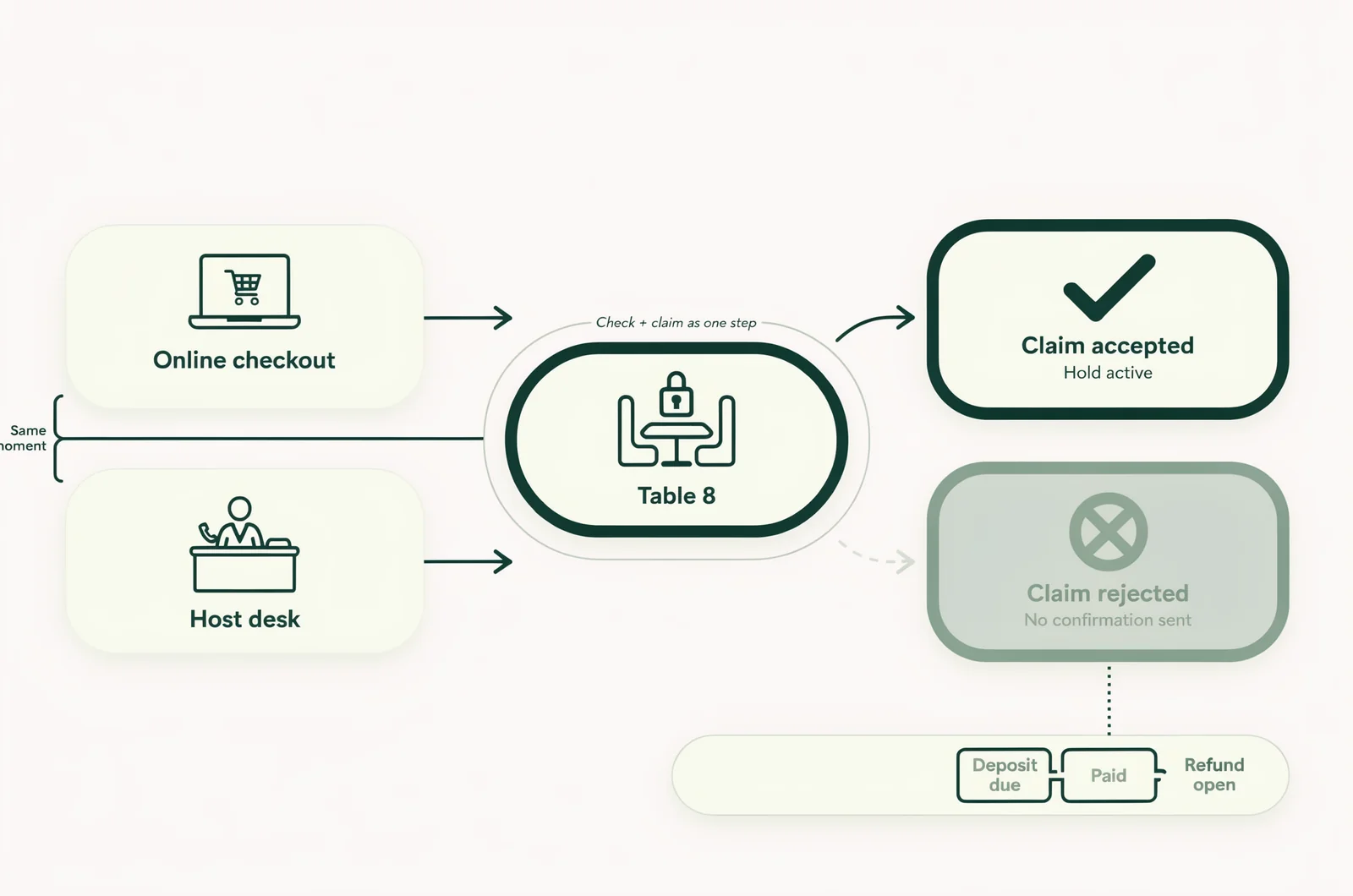
The booking system needs to check availability and record the claim as one indivisible action. Technical teams call this an atomic operation.
In the lounge example, an online guest and a host might both see Table 8 as available. When both attempt to reserve it, one claim must succeed. The other must receive an unavailable response before anyone sends a confirmation.
Refreshing screens faster cannot replace that control. Even a recent screen can become stale between viewing a table and submitting a reservation.
Ask whoever manages the booking system to demonstrate this exact conflict. Two separate devices should attempt the same table for the same booking period. Only one should receive a successful reservation.
A repeated submission also needs protection. If a host taps twice or retries after a slow response, the system should recognize the same booking attempt rather than create another reservation or charge.
Payment needs its own status
Payment status and inventory status answer different questions. One records money; the other records whether a table can be sold.
A pending deposit needs a defined hold deadline. Until that deadline, the table remains unavailable elsewhere. If the payment fails or the hold expires, the reservation must follow a stated release process.
A payment confirmation that arrives after expiry needs separate handling. It must not reclaim a table already assigned to someone else.
VenueStack brings table bookings and deposits into one platform. Keep table deposit requests attached to the reservation staff will use for seating, and define who resolves late or unmatched payments before doors open.
Define what each table status permits
Table statuses should tell staff whether they can promise the space and what must happen before its availability changes.
Choose a small set of states with distinct meanings. Treat the following as an operating model to map onto your booking system’s actual controls.
| Table status | Can another party book it? | What permits the next change? |
|---|---|---|
| Available | Yes, through a successful inventory claim | A new hold or confirmed reservation |
| Temporary hold | No, until the hold ends | Confirmation, cancellation, or controlled expiry |
| Confirmed | No, during the reserved period | Arrival or an authorized cancellation or release |
| Seated | No | Departure followed by a reset |
| Resetting | No | Staff confirmation that the space is ready |
| Blocked | No | An authorized decision to return it to sale |
Keep payment details alongside these states. An approved pay-on-arrival reservation may still be confirmed. A deposit refund may remain unfinished after a booking has been canceled.
Avoid vague labels such as pending unless staff can see exactly what is pending and whether the table remains protected.
Each active hold should identify its owner and expiry. Every confirmed reservation needs a booking reference. A blocked table needs a reason, such as a maintenance issue or an event layout change.
Restrict who can release confirmed tables. Record the staff member, time, previous status, and reason whenever that authority is used.
Keep presales, hosts, and walk-ins on the same floor
Every table sales channel needs access to the same availability controls. A shared floor plan loses its value when one channel keeps a separate list of promises.
Presales and host bookings
Online checkout should consume the same inventory that hosts use for manual table reservations. Staff should enter phone, chat, and promoter requests before telling a guest the booking is confirmed.
A host who needs time to collect details can create a temporary hold with a visible deadline. Writing the guest’s name in a personal message thread leaves everyone else unable to see that commitment.
When a guest changes tables, protect the destination before releasing the original assignment. Ideally, the system should handle the move as one operation. Otherwise, a failed move can leave the guest without either table.
Preserve the reservation reference through changes so the door can follow the booking’s history.
Door sales and promoter allocations
Walk-ins should follow the same claim process as presales. The door manager checks availability, secures the table, and receives confirmation before promising the space.
If you reserve inventory for walk-ins, define that allocation in the event table rules. Those tables must already be excluded from online availability.
Promoter allocations need an equally clear basis. A promoter can hold named tables or draw from a finite category allocation. Giving several promoters permission to sell the same remaining tables without a shared claim process creates competing promises.
Choose a handback time for unused allocations. At that point, an authorized person reconciles outstanding holds and returns eligible tables to the shared pool.
A guest list entry also needs a clear meaning. Attendance permission should never imply a table reservation unless a table booking is attached.
Release tables through a named decision
Releasing a presold table transfers its availability to another party. Assign that decision to a named role rather than letting each host interpret lateness independently.
Separate unpaid holds from confirmed bookings. An unpaid hold can follow its stated expiry rule. A confirmed reservation needs the late-arrival terms communicated to that guest, plus any approved exception.
An empty table may still belong to a party that has checked in and is waiting elsewhere. Before release, inspect the reservation’s arrival status and recent notes.
The release record should show:
- The original reservation reference and table assignment.
- The arrival deadline communicated to the guest.
- Any contact attempt or agreed extension.
- The manager who authorized release and the recorded time.
Change the inventory status before taking payment from the replacement party. A radio instruction to sell the table leaves other channels unaware of the decision.
Cancellations and refunds also need separate handling. Canceling a booking should establish whether its inventory returns to sale. Refunding money should not silently change a table assignment.
If the original party arrives after an authorized release, staff need access to that decision record. Assign one manager to explain the booking terms and handle any alternative arrangement.
Handle outages and conflicting promises
Connection problems require a temporary booking procedure that preserves a single person’s authority over table availability.
A cached floor plan can help staff identify reservations, but it cannot establish current availability. During an outage, pause new commitments through channels that cannot share updates. Put one designated manager in charge of recording any permitted bookings.
Do not let several devices independently accept reservations for later synchronization. They could each promise the same table before anyone sees the conflict.
On reconnection, reconcile the manager’s record against the booking system before reopening ordinary sales. Check both new bookings and status changes made during the outage.
During normal service, use the live floor management view to resolve assignments. Require staff to check the reservation record before relying on a screenshot or verbal handoff.
If two guests arrive with confirmations, protect the occupied space while a manager investigates. Compare reservation references, table assignments, payment records, and change timestamps.
Determine whether the incident is a duplicate record for one party, a wrong-table assignment, or two separate commitments. Those problems require different corrections.
Give the guests one staff contact while the manager works through available alternatives. Record the resolution against both bookings, including any reassignment and who approved it.
Measure conflicts and rehearse the last table
A venue needs evidence that its controls work when inventory runs low. Review prevented conflicts as well as disputes that reach the door.
Rehearse simultaneous claims
Use test reservations outside live service. Have the reservations desk and door attempt to claim the same remaining table while another device attempts online checkout.
The successful outcome is one accepted reservation. Every other attempt should receive a clear rejection without a guest confirmation or an unmatched payment.
Repeat the exercise for a combined table, an expired deposit hold, and a table move. Test what happens when a payment confirmation arrives after its original hold has ended.
Include an interrupted connection and a repeated submission. Staff should know which screen establishes success and what to do when the result remains uncertain.
A short interactive shift checklist could record whether each channel passes these scenarios and flag any unresolved failure before sales reopen.
Review interventions the morning after
Track the points where staff had to repair an inventory problem:
- Confirmed reservations that competed for the same table and period.
- Booking attempts rejected because another channel claimed the inventory.
- Holds that remained blocked beyond their intended expiry.
- Payments received without a valid table assignment.
- Table reassignments caused by reservation errors.
Keep prevented collisions separate from confirmed double bookings. A rejected second claim shows the inventory control did its job, though repeated attempts may reveal confusing staff screens.
Review incidents by channel and timing. A cluster around shift handover suggests a different problem from conflicts during online checkout.
Compare equivalent events using interventions per 100 table reservations, alongside the actual incident count. For each confirmed conflict, record the failed control, its owner, and the date it must be checked again.
Questions from the door and reservations desk
The remaining table decisions usually concern ambiguous reservations, late guests, and the relationship between seating and admission.
Can a spreadsheet prevent duplicate bookings?
A spreadsheet can support a controlled manual process when one person owns all booking decisions. It becomes harder to protect inventory when several people edit while online sales continue independently.
If you use one temporarily, funnel every commitment through its designated owner. Stop any channel that can sell without that person’s approval.
Should an unpaid reservation block a table?
Yes, when the venue has agreed to hold it. Give that hold an explicit deadline and make its inventory effect visible to every seller.
If staff are only discussing an inquiry, label it accordingly and avoid sending confirmation language that promises a table.
Can a late party’s table go straight to a walk-in?
Only after the agreed release conditions are met and the authorized manager records the decision. Check arrival status, extensions, and recent guest communication first.
Complete the release before creating the replacement reservation.
Does an available table mean the venue can admit more guests?
Table availability and admission capacity need separate checks. A seating assignment alone cannot establish whether additional guests can enter.
Define whether each table package includes admission, how many guests it covers, and how arrivals count toward the event’s attendance controls.