
On a busy night, multi room venue capacity compliance tracking comes down to a practical question: can the person admitting the next guest trust the count for that room? A venue-wide attendance total leaves gaps when guests move between a main room, lounge, terrace, and private area. Each crossing needs a clear counting rule.
Use this checklist to confirm your setup before opening, control movement during service, and retain a record afterward. Start with your venue’s documented limits and approved layout. Then connect admissions, departures, room transfers, and staff handovers to a count that people can act on.
Match each room to its approved limit
Room counts need boundaries that everyone recognizes. Match each tracked area to its documented occupancy limit, current layout, and the name staff use over the radio.
Walk the floor with the plan in hand. Mark public entrances, internal connections, smoking-area access, and routes used by staff or performers. A door that bypasses the main entrance still needs a counting arrangement.
Check the room names in your venue floor plan setup against the names on the count sheet. “Rear lounge” and “VIP room” should not describe the same space in different systems.
Separate the approved maximum from any lower operating threshold you choose for admission pauses. A buffer gives staff time to respond, but it does not change the documented limit. Confirm any overlapping restrictions, including a whole-venue limit or conditions that apply to connected areas. Spare room capacity should never automatically become extra building capacity.
Record how staff, performers, vendors, and guests fit within the applicable limit. If a document distinguishes total occupancy from guest allocation, resolve that distinction before setting guest headroom.
Finish with one dated room register that identifies each boundary, applicable limit, layout reference, and operating threshold. Leave unresolved areas closed to admissions until their arrangements are confirmed.
Run these checks before the first admission
The opening check should prove that the counting process works across the venue. Run it with the people who will handle the first arrivals.
- Confirm the starting population. Count everyone already inside each tracked area, including staff and contractors under your counting rules. Record the time and starting figure.
- Assign every crossing. Name the person or counting method responsible for each entrance, departure route, and internal connection. Cover breaks and less-used doors.
- Test a complete movement. Walk someone through entry, room transfer, exit, and re-entry. Check that every affected count changes once.
- Set the pause instruction. Agree who can stop admissions, what message they use, and who confirms that entry can resume.
- Check the shared count. Verify that door and floor teams see the same current information. Make the last update time visible.
- Prepare the fallback. Put manual logs, counters, charged devices, and contact details where staff can reach them. Assign responsibility for later reconciliation.
- Record readiness. Have the duty manager review gaps, confirm coverage, and save the opening baseline before admitting guests.
Include a device check using your mobile ticket scanning practices. Test the actual door position and lighting, then repeat the test at any separate entrance.
Keep room counts separate from tickets sold
Room occupancy starts with people physically present. Ticket sales, reservations, deposits, and guest-list names describe expected attendance or admission rights.
Count the people who actually arrive
A table reservation for several guests does not establish how many have entered. Record arrivals as people cross the controlled boundary. Apply the same rule to complimentary guests, walk-ins, late additions, and guests admitted through a separate entrance.
VenueStack brings ticketing, table bookings, guest lists, and check-in into one system. That can help staff reconcile arrival records across booking types. Confirm separately how your operation records departures and room movements before treating check-in data as a live occupancy count.
Review pre-sale overselling checks alongside the live process. Sales allocations and current occupancy answer different questions, and both need attention.
Use a movement balance for each room
Build each room’s running count from its opening population, entries, exits, transfers in, and transfers out. Keep those categories distinct so staff can explain a change.
For the whole venue, an internal transfer should leave the total unchanged. A departure from the building should reduce it. Define how exterior areas fit into your boundaries before applying that rule.
Account for staff movements too. A guest-only counter needs a separate, current staff count if the applicable room limit includes everyone present. Never subtract an expected departure before it happens.
Count every crossing between rooms
Internal movement can fill one room while the entrance team still sees space elsewhere. Give each connection a counting method and a person responsible for watching it.
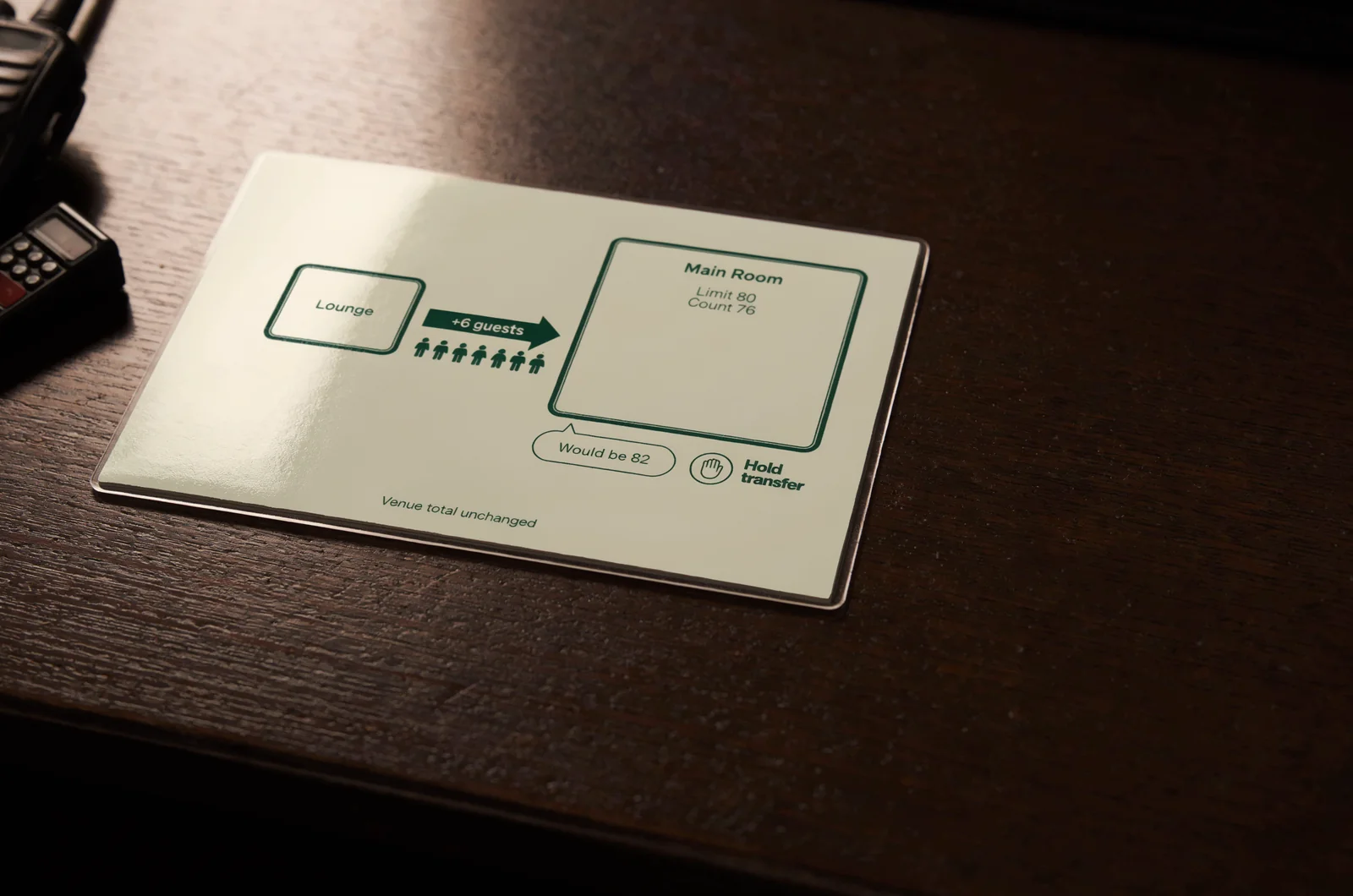
Consider a hypothetical room with a confirmed limit of 80 people and a current count of 76. Six guests moving in from the lounge would bring it to 82. The venue-wide total would remain unchanged, so the main entrance count would not reveal the room-level problem.
Check destination headroom before allowing that transfer. Keep any waiting group in an agreed location that preserves circulation and exit access. Explain the pause before guests reach the doorway.
Choose one authoritative record for each transfer. If two staff members are involved, agree who records the movement and who confirms receipt. Avoid two independent entries that could count the same crossing twice.
A transfer record should identify the origin, destination, number of people, time, and responsible staff member. Record the completed movement, rather than a group’s stated intention to move.
Physical conditions matter here. If guests can cross through an unstaffed connection, a counter elsewhere cannot capture that movement reliably. Change the staffing or counting arrangement before relying on the room figure.
Check the destination count after a large movement and before releasing the next group.
Give admission pauses a clear owner
A room count becomes useful when someone has authority to act on it. Name the person who can pause entry and the person who can authorize reopening.
Set an operating threshold that accounts for the time between observing a count, communicating it, and stopping arrivals. Review your capacity planning controls to distinguish sales allocations, room limits, alerts, and actual admission controls.
Use a specific radio message: room name, verified count, time, and instruction. A vague report that a room “looks full” leaves the receiving team to guess.
The pause should cover every route into the affected room, including internal transfers and guest-list access. Keep departures available. Staff should not solve a counting problem by blocking an exit.
Reopening needs a fresh, credible count and confirmation that the conditions behind the pause have been addressed. A report that several people “probably left” is insufficient. Record who authorized the restart and when.
If the room is already above its applicable limit, escalate through the venue’s established safety procedure and stop further admission into it. Preserve the incident record.
A useful room-headroom calculator would accept the applicable limit, operating threshold, and verified occupancy. It should display remaining places against both thresholds and flag stale counts. It should never convert unsold tickets into assumed room availability.
Keep counts usable when devices or people change
Room tracking needs continuity through connection failures, breaks, and shift changes. Decide how that continuity works while the venue is quiet.
Switch to a defined fallback when data stops updating
A device can accept a scan while another screen remains behind. Make staff check synchronization status and the last update time, rather than assuming that a responsive screen is current.
Review likely QR code check-in failures before service. Distinguish a ticket-validation problem from a missing or delayed occupancy update.
When shared data becomes unreliable, assign one counting source for the affected period. Record the last trusted baseline and the time manual recording begins. Keep track of admissions, departures, and transfers during the gap.
Offline scanning may preserve admission records, but confirm how devices reconcile before relying on a combined count. Separate devices can each hold incomplete information.
If staff cannot establish credible headroom, pause additional admissions to the affected area while the duty manager resolves the count. Continue to manage safe departures and circulation.
Hand over the current count and its uncertainties
At a shift change, the outgoing and incoming staff members should review the same figures together. Include current occupancy, update time, active pauses, device problems, and unresolved adjustments.
Record the handover time and both staff members’ names or staff IDs. Keep the existing count running.
A replacement counter should start from the confirmed current figure. If the teams disagree, reconcile the difference before admissions continue under the replacement’s count. Assign another staff member to maintain door coverage during that check.
Save a record that explains the whole night
The end-of-night record should let a manager follow how room counts changed. A final attendance total cannot explain a temporary crowding problem earlier in service.
Preserve movements, pauses, and corrections
Keep the opening room register, starting counts, timestamped movements or count records, admission holds, handovers, and incident notes together. Use a consistent time zone across devices and manual sheets.
Identify the event, date, room, applicable limit, and layout version. Record temporary operating changes, including an area closure or a moved transfer point.
Preserve corrections with their original value, revised value, time, person responsible, and reason. An unexplained edit weakens the record. Write an uncertainty plainly if staff cannot reconstruct it.
Save the highest recorded count for each room and its timestamp. Describe it as the highest recorded figure unless the completeness of the record supports a stronger statement. Gaps in counting remain gaps even when every saved figure is below the limit.
Reconcile attendance without hiding count gaps
Use VenueStack’s check-in and event reporting alongside the separate movement records your operation maintains. Compare arrivals across tickets, tables, guest lists, and other entry routes. Investigate differences before closing the event record.
Keep transferred guests from appearing as new venue admissions during reconciliation. Likewise, distinguish re-entry from a first arrival.
A closing figure of zero confirms the recorded end state; it does not establish every earlier room count. Have the manager sign off unresolved discrepancies, assign any follow-up, and retain the record under the venue’s applicable requirements.
Resolve counting or coverage failures before the next event opens.
Questions that come up at the room door
Several decisions need a consistent answer while guests are waiting. Set these answers during the staff briefing.
Does an unused ticket mean there is room for a walk-in?
An unused ticket does not describe current occupancy. A walk-in decision needs verified room and venue headroom, plus consideration of remaining admission commitments. Confirm the sales and admission rules together before releasing more inventory.
Can a re-entry scan replace an exit count?
Only a process that captures both the departure and return can maintain that movement balance. Confirm what the scan changes in your records. A ticket-validity check alone does not establish whether someone is currently inside.
What if the counter and a floor check disagree?
Pause additional entry to the affected room while the duty manager checks the last trusted count and subsequent movements. Keep departures available. Record any supervised recount or correction with its reason, and identify who authorized admissions to resume. Do not silently replace one figure with another.