Loading articles…
Loading articles…
Read the promoter report
Updated
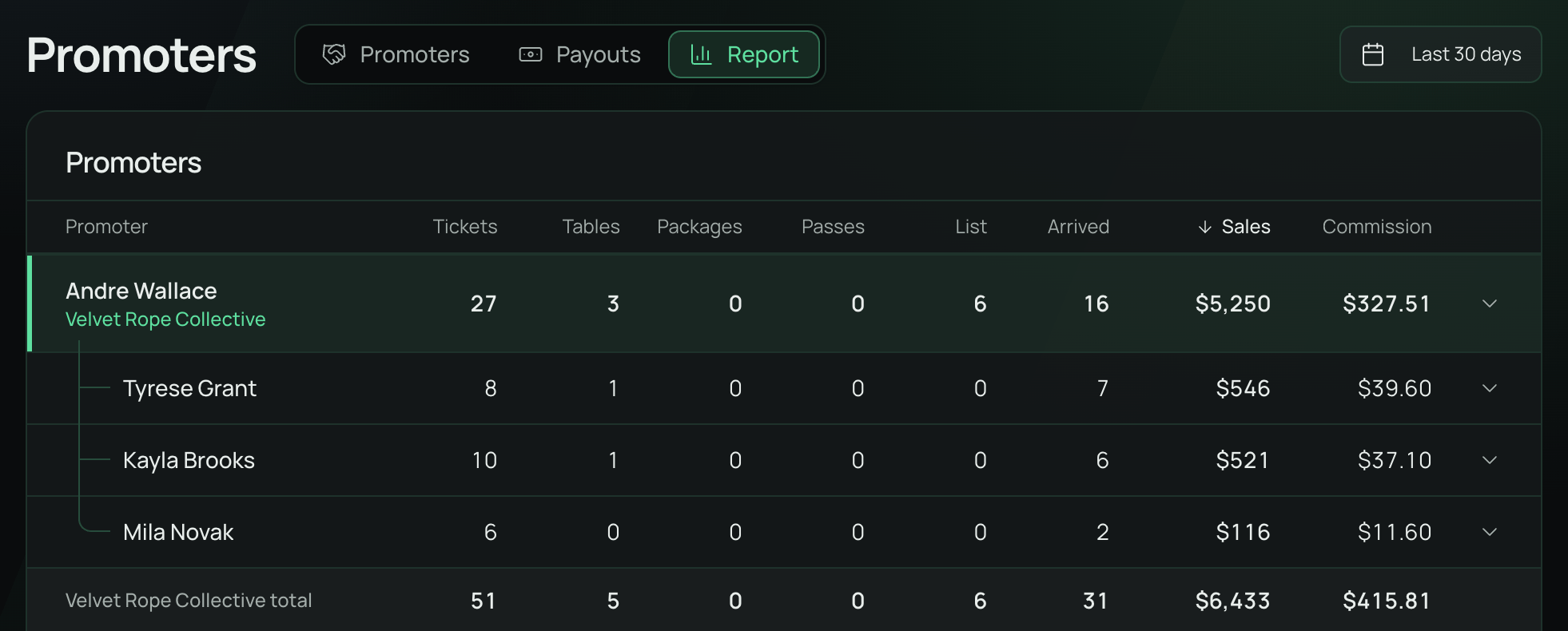
The promoter report shows the tickets, tables, table packages, passes and guest list names your promoters brought in, and what they earned.
Open the report
- Go to Promoters and choose Report.
- Pick a date range at the top right. The report covers sales made in that range.
What you've paid them, and what you still owe, is on Payouts.
Each promoter
The list has a row for each promoter with sales in the range: their tickets, tables, packages, passes, guest List places, guests who arrived, Sales and Commission. Click a row to see the nights their sales were for. A promoter you removed still shows here for sales they made while they were with you.
To sort the list, click a column heading, and click it again to turn the order round. On a phone, pick the order at the top of the list.
Sub promoters sit under their head promoter, joined to them by a line. The head's row is highlighted, with the company's name, and a total row closes the company: everything it sold and what you owe for it. Sorting keeps each company together, in order of its totals. A sub promoter's commission is owed to their head, not to them. See Promoter companies.
How sales are credited
- A sale through a promoter's link is theirs.
- A promo code tied to a promoter credits them too, even without their link. If a guest used one promoter's link and another promoter's code, the code wins.
- Sales and Commission are what stayed after refunds, before fees and tax.
- Commission uses the rate in force when the sale was made, so changing a rate never changes past nights.
- A guest list place earns only when the guest is checked in.
- A table counts what the guest paid at checkout, or a request's first deposit. A package counts only when bought in the same checkout as the table. What you collect later is yours.
 VenueStack on your phoneRun your venue from your pocket.How to install